 |
0.1.33
|
|
0.1.33
|
| Dependencies | Visualizer plugin CollisionDetection plugin |
|---|---|
| Python Import | from pyhelios import LiDARCloud |
| Main Class | LiDARCloud |
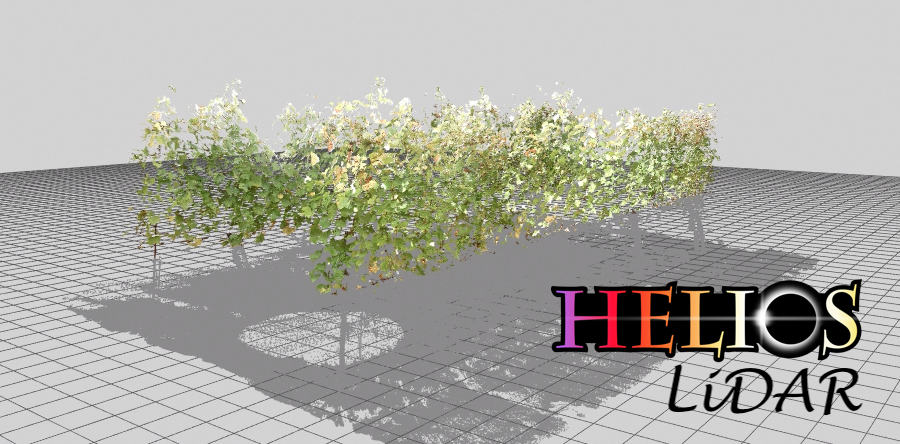
calculateLeafArea() handles both single-return and multi-return data automatically. isMultiReturnData() (helios-core 1.3.85) reports which kind the cloud holds: True if any hit has target_count greater than 1. This is a behavioral switch, not just a descriptive property — triangulateHitPoints() triangulates first returns only (with an adaptive separation filter) for multi-return data and treats every return independently otherwise, and the two can differ substantially in reconstructed surface area — so a cloud assembled by hand (for example through addHitPoints()) can confirm which branch will run. Multi-return data must also carry the timestamp and target_index fields; if target_count > 1 is present but either is missing, isMultiReturnData() raises rather than reporting an answer the rest of the pipeline cannot act on.The LiDAR plugin is used to process terrestrial LiDAR data into information that is useful for plant models. For example, this may be to determine leaf area and angle distributions at the voxel scale, or to reconstruct individual leaves and add them to the Context.
The LiDAR plugin uses the CollisionDetection plugin for ray tracing. GPU acceleration is optional and controlled through the CollisionDetection plugin:
To enable GPU acceleration for faster processing of large point clouds, call enableCDGPUAcceleration() before running scans:
GPU acceleration can be turned off again with disableCDGPUAcceleration(). To check whether a usable GPU is present before enabling it, call isGPUAvailable() (true only if the plugin was compiled with CUDA, a CUDA device is present at runtime, and HELIOS_NO_GPU is unset); isGPUAccelerationEnabled() reports whether GPU acceleration is currently toggled on.
For long-running synthetic scans you can observe progress without blocking: setSyntheticScanProgressPointer(ctypes.c_int) registers a caller-owned counter that syntheticScan() updates with the 0-based index of the scan currently being ray-traced (set to getScanCount() when finished), and setProgressCallback(fn) registers a Python callback invoked with (progress_fraction, message) during the scan (pass None to clear either one).
| Constructors |
|---|
| LiDARCloud() |
The LiDARCloud class contains point cloud data, and is used to perform processing operations on the data. The class constructor does not take any arguments. It supports the context manager protocol for automatic resource cleanup.
| Primitive Data Label | Symbol | Units | Data Type | Description | Available Plug-ins | Default Value |
|---|---|---|---|---|---|---|
| reflectivity_lidar | \(\rho_l\) | unitless | float | Primitive reflectivity in the waveband of the laser. This is used to calculate the return intensity in synthetic scans. | N/A | 1.0 |
The algorithms associated with the LiDAR plugin work with data obtained from a rectangular scan pattern. In this scan pattern, points are sampled at equally spaced intervals in both the zenithal ( \(\theta\)) and azimuthal ( \(\varphi\)) directions. At a given azimuthal angle, some range of zenithal angles are consecutively scanned, which represents a "scan line". Each scan line starts at some zenithal angle \(\theta\)min and ends at some zenithal angle \(\theta\)max. After recording a scan line at the first azimuthal angle \(\varphi\)min, the scanner incrementally moves to the next adjacent azimuthal scan direction and records the next scan line until it reaches the azimuthal angle \(\varphi\)max.
The number of zenithal points within each scan line is given by \(\mathrm{N}_{\theta}\), and the total number of scan lines (i.e., number of individual azimuthal directions) is given by \(\mathrm{N}_{\varphi}\).
Angles passed to the Python API (e.g. addScan()) are specified in radians. Angles given in an XML scan file are specified in degrees (matching the C++ XML convention). Distance units are arbitrary, but must be used consistently.
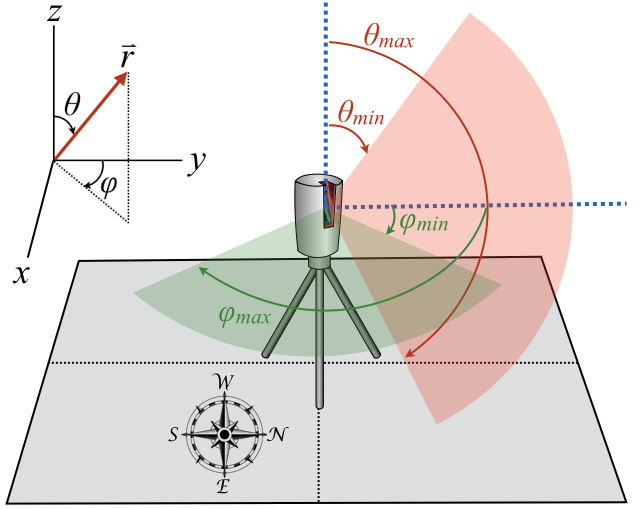
Scan pattern: the scanner traverses some range of zenithal and azimuthal angles to explore a portion of the spherical space surrounding the scanner.
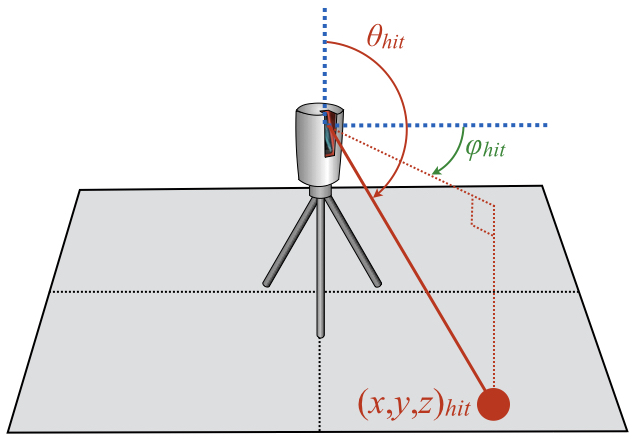
For each scan direction, the scanner records the (x,y,z) Cartesian position of the point of intersection between the ray path and the object's surface. Each Cartesian position corresponds to spherical coordinate (zenith,azimuth) representing the scan direction.
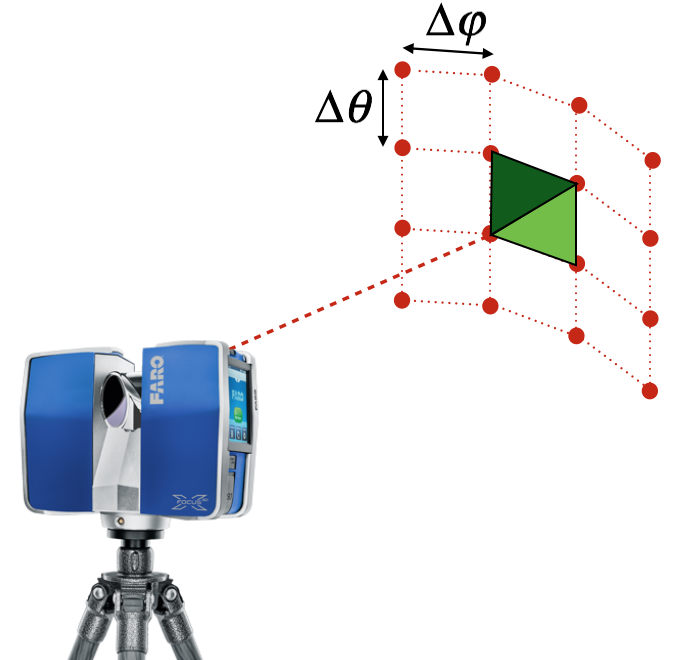
The rectangular scan pattern creates quadrilateral polygons between four neighboring points.
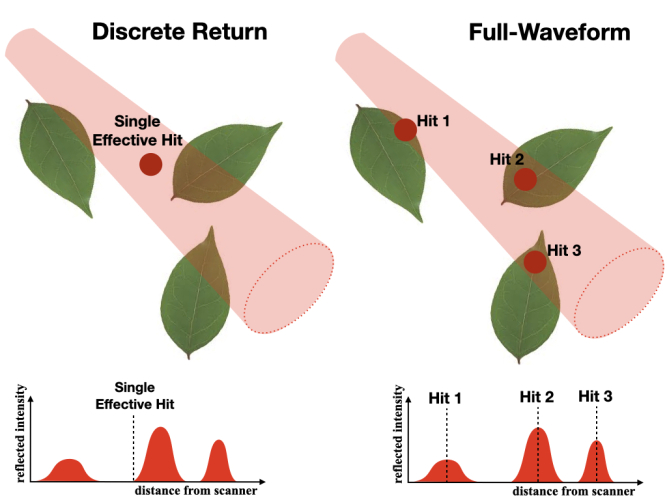
The laser beam emitted from a LiDAR instrument has some finite diameter, which increases with distance from the scanner. In many cases, the beam diameter may be larger than the width of individual leaves by the time it reaches the canopy. This means that a single laser pulse may intersect multiple objects along its path to the ground.
LiDAR data is commonly classified along two independent axes that are easy to conflate. The first is the instrument's detection method: a discrete-return instrument detects peaks in the returning signal in real time and records a small number of discrete points per pulse, whereas a full-waveform instrument digitizes and stores the entire returned signal as a function of time (the "waveform"), from which the individual returns are later extracted. The second axis is the number of returns recorded per pulse: single-return (one hit point per pulse) versus multi-return (several hit points per pulse, e.g. first, second, ..., last). These two axes are independent: discrete-return instruments routinely record multiple returns per pulse, and full-waveform instruments also ultimately output discrete returns once the waveform is decomposed.
The Helios LiDAR plugin works entirely with discrete return points — it does not produce, store, or export a digitized waveform. What it distinguishes, and what this documentation refers to throughout, is the number of returns recorded per pulse:
Real instruments that produce multi-return data (such as the RIEGL VZ series) are often full-waveform internally, but the exported point cloud — and everything Helios simulates and processes — consists of discrete returns, not waveforms.
Each scan has a set of parameters or "metadata" that must be specified in order to process the data. Some parameters are optional, while some are required. The following metadata is needed to define the overall scan itself, in addition to individual scan hit points. Note that XML tags are case-sensitive.
The tags in the table below are common to all scan types. The tags that define the geometry of the scan depend on the scan pattern (selected with the <scanPattern> tag) and are listed separately for each pattern in Rectangular raster scan pattern and Spinning multibeam scan pattern below.
| Metadata | XML tag | Description | Python parameter (addScan/addScanSpinning) | Default behavior |
|---|---|---|---|---|
| Scanner origin | <origin> | (x,y,z) coordinate of the scanner. This is the position where the scanner rays are sent from. | origin (vec3) | None: REQUIRED |
| Scan pattern | <scanPattern> | Geometric pattern of beam directions: either raster (a uniform angular grid in zenith and azimuth — the default panoramic terrestrial-scanner pattern) or spinning_multibeam (a rotating multi-channel sensor such as a Velodyne, Ouster, or Hesai unit). The geometry of each pattern is defined by additional tags listed below. | addScan() (raster) or addScanSpinning() (spinning multibeam) | raster |
| Translation | <translation> | Global (x,y,z) translation to be applied to entire scan, including the origin and all hit points. | Use coordinateShift() | No translation |
| Rotation | <rotation> | Global spherical rotation (theta,phi) to be applied to the entire scan, including the origin and all hit points. | Use coordinateRotation() | No rotation |
| Beam exit diameter (meters) | <exitDiameter> | Effective diameter of laser beam exiting the instrument. Only used for multi-return synthetic data generation. | exit_diameter | 0 (single return) |
| Beam divergence angle (rad) | <beamDivergence> | Angle of laser beam divergence after exiting the instrument. Only used for multi-return synthetic data generation. | beam_divergence | 0 |
| Range noise std. dev. (meters) | <rangeNoiseStdDev> | Standard deviation of zero-mean Gaussian noise added to the measured range (distance) of each return during synthetic scan generation. The hit point is displaced along the beam direction, producing the along-beam component of the positional error. Only used for synthetic data generation. | range_noise_stddev | 0 (no noise) |
| Angular noise std. dev. (rad) | <angleNoiseStdDev> | Standard deviation of zero-mean Gaussian jitter applied to the pointing direction of each pulse during synthetic scan generation. This produces the across-beam (lateral) component of the positional error, which grows with range. Only used for synthetic data generation. | angle_noise_stddev | 0 (no jitter) |
| Scanner tilt (roll, pitch) | <scanTilt> | Global scanner tilt applied to the entire scan frame about the scanner origin during synthetic scan generation. This models the residual tilt of the scanner spin axis away from true vertical (plumb) that a real terrestrial scanner's dual-axis inclinometer reports. Two angles are given (roll then pitch), applied in that order, in a right-handed, Z-up body frame: roll is a right-hand rotation about the body lateral axis and pitch is a right-hand rotation about the body forward (azimuth-zero) axis. Commercial scanners do not share a universal inclinometer sign convention, so verify signs against the specific instrument. Only used for synthetic data generation. XML uses degrees; Python API uses radians. | scan_tilt_roll, scan_tilt_pitch (radians) | 0 0 (perfectly level) |
| Return mode | <returnMode> | How a pulse reports detected returns during analytic-waveform synthetic scan generation (more than one ray per pulse): multi reports every detected return with no limit (discrete multi-return instrument), while single reports a limited number of points per pulse — at most <maxReturns> of them, selected by <singleReturnSelection>. A single ray per pulse always produces an idealized exact intersection. Set in Python with setScanReturnMode() (ReturnMode.MULTI/ReturnMode.SINGLE) or the return_mode argument of syntheticScan(). Only used for synthetic data generation. | setScanReturnMode() / syntheticScan(return_mode=...) | multi |
| Single-return selection | <singleReturnSelection> | Which return(s) are kept when <returnMode> is single and more returns than <maxReturns> are resolved: strongest (largest echo amplitude), first (nearest), or last (farthest). The kept returns are always reported nearest-first. Only used for synthetic data generation. | setScanSingleReturnSelection() (SingleReturnSelection enum) | strongest |
| Maximum returns per pulse | <maxReturns> | Maximum number of returns reported per pulse when <returnMode> is single: 1 = single-return, 2 = dual-return, N = N-return. When a pulse resolves more returns than this, the <singleReturnSelection> policy chooses which to keep. Must be at least 1. Ignored when <returnMode> is multi. Only used for synthetic data generation. | setScanMaxReturns() | 1 (single-return) |
| Pulse width / range resolution (meters) | <pulseWidth> | Range-resolution distance used to merge sub-ray hits into discrete returns: two surfaces closer than this distance merge into a single return, reproducing the range-resolution (dead-zone) limit of a real instrument. (Alternatively specify <pulseDuration> in seconds in XML.) When 0, the synthetic scanner uses the pulse_distance_threshold argument of syntheticScan() instead. Only used for synthetic data generation. | setScanPulseWidth() | 0 (use syntheticScan argument) |
| Detection threshold (energy fraction) | <detectionThreshold> | Minimum return energy fraction (range-normalized echo amplitude as a fraction of total per-pulse beam energy) for a return to be detected. Returns weaker than this are discarded, modeling the noise floor of a real instrument. Only used for synthetic data generation. | setScanDetectionThreshold() | 0 (no suppression) |
| ASCII point cloud file | <filename> | File containing point cloud data to be read. | Loaded via loadXML() | No file will be read |
| ASCII file column format | <ASCII_format> | Labels for columns in ASCII point cloud file. See Loading Scan Data from File for possible values and examples. | column_format, or loaded via loadXML() | x y z |
The default scan pattern (<scanPattern> raster </scanPattern>, or simply omitting the <scanPattern> tag) is a rectangular raster: a uniform angular grid of \(\mathrm{N}_\theta\times\mathrm{N}_\varphi\) beam directions spanning the zenith range [ \(\theta\)min, \(\theta\)max] and the azimuth range [ \(\varphi\)min, \(\varphi\)max]. This corresponds to a panoramic terrestrial laser scanner operating in gridded mode (e.g. RIEGL VZ, Leica, FARO Focus). In the Python API a raster scan is created with addScan(). The geometry is defined by the following tags, in addition to the common tags above:
| Metadata | XML tag | Description | Python parameter (addScan) | Default behavior |
|---|---|---|---|---|
| Size | <size> | Number of scan points in the theta (zenithal) and phi (azimuthal) directions, \(\mathrm{N}_\theta\) and \(\mathrm{N}_\varphi\). | Ntheta, Nphi (int) | None: REQUIRED |
| \(\theta\)min | <thetaMin> | Minimum scan theta (zenithal) angle. \(\theta\)min=0 if the scan starts from upward vertical, \(\theta\)min=90° (π/2 rad) if the scan starts from horizontal. XML uses degrees; Python API uses radians. | theta_range[0] (radians) | 0 |
| \(\theta\)max | <thetaMax> | Maximum scan theta (zenithal) angle. \(\theta\)max=90° (π/2 rad) if the scan ends at horizontal, \(\theta\)max=180° (π rad) if the scan ends at downward vertical. XML uses degrees; Python API uses radians. | theta_range[1] (radians) | π |
| \(\varphi\)min | <phiMin> | Minimum scan phi (azimuthal) angle. \(\varphi\)min=0 if the scan starts pointing in the +y direction, \(\varphi\)min=90° (π/2 rad) if the scan starts pointing in the +x direction. XML uses degrees; Python API uses radians. | phi_range[0] (radians) | 0 |
| \(\varphi\)max | <phiMax> | Maximum scan phi (azimuthal) angle. NOTE: \(\varphi\)max can be greater than 360° (2π rad) if \(\varphi\)min > 0 and the scanner makes a full rotation in the azimuthal direction, in which case \(\varphi\)max = \(\varphi\)min + 360°. XML uses degrees; Python API uses radians. | phi_range[1] (radians) | 2π |
A rotating multi-channel sensor (e.g. Velodyne, Ouster, Hesai) is the most common pattern for mobile and UAV plant scanning. \(\mathrm{N}_\theta\) laser channels are each fixed at their own (generally non-uniformly spaced) elevation angle, and the whole head rotates continuously while the platform moves along a trajectory. The pattern is represented internally as the same \(\mathrm{N}_\theta\times\mathrm{N}_\varphi\) scan table used by a raster scan, so all downstream processing — ray tracing, hit tables, leaf-area and leaf-angle inversion — is identical to a raster scan. Each synthetic hit additionally records a channel data value giving the laser channel (scan-table row) that produced it.
A spinning sensor is set up from its physical parameters — channel elevation angles, azimuth resolution, pulse repetition rate (PRF), and a platform trajectory — not from a hand-sized azimuth grid. In the Python API this is addScanSpinning(); in XML it is the <azimuthStep>, <PRF>, and trajectory tags. See Physical-parameter spinning and moving-raster scans for the full setup (including a stationary "spin in place" capture) and Spinning multibeam (addScanSpinning()) for the addScanSpinning() reference. The geometric pattern of a stored scan can be queried with getScanPattern() (returns ScanPattern.SPINNING_MULTIBEAM) and its per-channel zenith angles with getScanBeamZenithAngles(); the acquisition mode is getScanMode() (ScanMode.SPINNING).
gapfillMisses(), which assumes a regular angular grid. For non-raster patterns, generate synthetic scans with miss recording enabled by calling syntheticScan() with record_misses=True (see Recording miss points in a synthetic scan), which records the misses directly and does not rely on grid reconstruction.triangulateHitPoints() should be matched to the point spacing of the pattern. Spinning multibeam channels are spaced more coarsely in the vertical (zenithal) direction than a dense raster scan, so a larger triangulation distance may be needed for leaf-angle and leaf-area reconstruction.The scan pattern of a stored scan can be queried with getScanPattern() (returns ScanPattern.RASTER or ScanPattern.SPINNING_MULTIBEAM), and the per-channel zenith angles of a multibeam scan with getScanBeamZenithAngles() (returns an empty list for a raster scan).
In addition to scan metadata, the data collected by the scan itself must also be added to the plugin. This can be achieved by either reading data from an ASCII text file, or performing a synthetic scan. At a minimum, point cloud data consists of the Cartesian (x,y,z) coordinates of each hit in the scan. Additionally, hit points may also have an associated r-g-b color value, or some other scalar data value such as intensity or temperature.
For the processing algorithms to work, the scan direction associated with each hit point must also be known. This can be specified directly as a ( \(\theta\), \(\varphi\)) spherical coordinate, or using the row (i.e., index in the scanline: 1... \(\mathrm{N}_\theta\)) and column (i.e., scanline index: 1... \(\mathrm{N}_\varphi\)). Otherwise, it will calculate the scan direction by drawing a line between the scan origin position and the hit point.
For multi-return data, additional information is needed about the hit points. Specifically, the total number of hit points along the pulse. The index can start at 0 or 1 for the first hit along the pulse, it just should be consistent for all points.
Scan metadata is typically specified by loading an XML file containing the relevant metadata for each scan. For real data, the XML file specifies the path to an ASCII text file that contains the data for each scan. For synthetic data, the parameters of the simulated scan are loaded from the XML file and used to perform the scan.
The code below gives a sample XML file for loading multiple scans. As specified in the metadata table above, not all entries are required.
The ASCII text file containing the data is a plain text file, where each row corresponds to a hit point and each column is some data value associated with that hit point. The "ASCII_format" tag defines the column format of the ASCII text file (in this case, file.xyz). Each entry in the list specifies the meaning of each column. Possible fields are listed in the table below:
| Label | Description | Default behavior |
|---|---|---|
| x | x-component of the (x,y,z) Cartesian coordinate of the hit point. | None: REQUIRED |
| y | y-component of the (x,y,z) Cartesian coordinate of the hit point. | None: REQUIRED |
| z | z-component of the (x,y,z) Cartesian coordinate of the hit point. | None: REQUIRED |
| zenith (or zenith_rad) | Zenithal angle (degrees) of scan ray direction corresponding to the hit point. If "zenith_rad" is used, theta has units of radians rather than degrees. | Calculated from scan origin and hit (x,y,z) |
| azimuth (or azimuth_rad) | Azimuthal angle (degrees) of scan ray direction corresponding to the hit point. If "azimuth_rad" is used, phi has units of radians rather than degrees. | Calculated from scan origin and hit (x,y,z) |
| r (or r255) | Red component of (r,g,b) hit color. If "r" tag is used, r is a floating point value between 0 and 1. If "r255" is used, r is an integer between 0 and 255. | r=1 or r255=255 |
| g (or g255) | Green component of (r,g,b) hit color. If "g" tag is used, g is a floating point value between 0 and 1. If "g255" is used, g is an integer between 0 and 255. | g=0 or g255=0 |
| b (or b255) | Blue component of (r,g,b) hit color. If "b" tag is used, b is a floating point value between 0 and 1. If "b255" is used, b is an integer between 0 and 255. | b=0 or b255=0 |
| target_count | Number of hits along scan pulse. | Assumed to be single-return data |
| target_index | Index of hit along scan pulse. | Assumed to be single-return data |
| timestamp | Unique timestamp of hit point. | Assumed to be single-return data |
| row | Scan-grid row index (zenithal/theta direction) of the hit point. Used by gapfillMisses() to reconstruct miss directions when timestamps are unavailable (see below). | N/A |
| column | Scan-grid column index (azimuthal/phi direction) of the hit point. Used by gapfillMisses() to reconstruct miss directions when timestamps are unavailable (see below). | N/A |
| is_miss | Miss flag for the hit (1 = miss/transmitted beam, 0 = return). When present in the imported file, misses are read directly and no reconstruction is needed (see Miss points (transmitted beams) and how to export them). | N/A |
| deviation | Indication of variability in return within a given hit point. Note: this is never used for real data, but can be output for synthetic data. | N/A |
| echo_width | Range spread (width) of the return in meters: the transmit pulse range-extent combined in quadrature with the range spread of the surfaces that merged into the return. Note: this is computed for synthetic data only (analytic-waveform multi-ray scans). | N/A |
| intensity | Range-normalized intensity of return, equal to \(\rho\,\cos\theta\) (per-primitive reflectivity times the incidence-angle cosine) with the \(1/R^2\) range loss of the LiDAR range equation normalized out, so it is independent of the scanner-to-target range. Note: this is never used for real data, but can be output for synthetic data. | N/A |
| reflectance | Synthetic return reflectance in decibels, \(10\,\log_{10}|I|\) where \(I\) is the range-normalized intensity, relative to a perfect Lambertian reflector at normal incidence (0 dB). Output only when "reflectance" is listed in the ASCII_format. Note: this is computed for synthetic data only. | N/A |
| (label) | User-defined floating-point data value. "label" can be any string describing data. For example, "temperature", etc. | N/A |
exportPointCloud() or exportScans(), each ASCII data file begins with a comment-line header that starts with '#' and lists the column field names (the same fields given in the "ASCII_format" tag), for example # x y z intensity reflectance. This makes the exported file self-describing and follows the conventional ASCII point-cloud header recognized by tools such as CloudCompare. The header is written by default; pass write_header=False to exportPointCloud() to suppress it. When loading, any line beginning with '#' is treated as a comment and skipped, so headered files round-trip without modification.The XML file can be automatically loaded into the point cloud using the loadXML() method:
calculateLeafArea()) requires the population of miss points — laser pulses that were fired but did not return from any object, having passed through the canopy to the sky. The canopy gap fraction that the inversion is built on is, by definition, the number of pulses with no canopy return divided by the total number of pulses fired in that direction range, so the no-return pulses are an essential part of the measurement, not optional metadata. An ordinary point cloud contains only points where something was hit, so most instrument software drops the no-return pulses when it exports a point cloud. If you import such a "returns-only" file and run the leaf-area inversion without taking one of the steps below, the gap fraction has no valid denominator and the result will be badly biased. calculateLeafArea() detects this case and raises an error rather than silently producing a wrong number.A hit point is flagged as a miss with the per-hit is_miss data value (1 = miss, 0 = return). You can check programmatically whether the cloud contains any misses with hasMisses(), and whether a particular hit is a miss with isHitMiss(index). The miss points themselves are placed along their beam at the distance returned by LiDARCloud.getMissDistance(). You can satisfy the requirement in one of three ways, listed from most to least faithful to the original measurement:
| # | Approach | What you must provide in the imported ASCII file | When to use |
|---|---|---|---|
| 1 | Import the misses directly | An ASCII file that includes the no-return pulses, with an is_miss column (1 for the no-return pulses, 0 for returns) listed in the <ASCII_format>. Including row/column or timestamp as well is recommended but not required once is_miss is present. | Preferred. The true fired-beam geometry is used directly, with no reconstruction or assumptions. |
| 2 | Reconstruct the misses with gapfillMisses() | A returns-only ASCII file that still carries either row and column scan-grid indices, or a per-return timestamp, in the <ASCII_format>. gapfillMisses() infers the empty (sky) directions of the scan grid from the returns and emits a miss for each. | When you cannot export the no-return pulses but can export the row/column indices or timestamps. Works only for a regular raster scan grid. |
| 3 | Generate a synthetic scan with miss recording | Helios geometry plus a scan definition; call syntheticScan() with record_misses=True (see Recording miss points in a synthetic scan). | When you are simulating, not importing, real data. Misses are recorded directly; this is the only option for non-raster (e.g. spinning-multibeam) patterns. |
If you import a returns-only file with none of is_miss, row/column, or timestamp, there is no information from which the miss directions can be recovered, and neither approach 1 nor 2 is possible. The triangulation, leaf-angle, and plant-reconstruction routines do not require misses and will still run, but the leaf-area inversion cannot. In that case you must re-export the data from the original instrument project so that the necessary information is retained, because it was discarded at export time and cannot be reconstructed afterward.
Helios imports plain ASCII/text point-cloud files (see loadXML() and the column table above); it does not read vendor binary formats (PTX, FLS, RDB, E57, LAS, etc.) directly. The task at export time is therefore to produce an ASCII file that satisfies approach 1 or 2 above. Exact menu names and options vary between software packages and versions, so the guidance below describes what capability to look for and how it maps to the Helios columns, rather than an exact click-path; verify the specifics against your software's current documentation.
XYZ with the "Include row/col" option enabled, which writes the scan-grid row and column index of each return as additional columns. This is an ordinary unstructured export — it contains only the returns, not the empty cells — but because every return is tagged with its grid row and column, gapfillMisses() can reconstruct the empty (miss) directions. Map those columns to the Helios row and column tokens in the <ASCII_format> (together with x, y, z and any intensity/color you want), then call gapfillMisses().is_miss (1 for a zero/no-return cell, 0 otherwise). With is_miss present you are using approach 1; with only row/column present you are using approach 2 and call gapfillMisses().timestamp (mapped to the Helios timestamp column) along with x, y, z, and let gapfillMisses() reconstruct the miss directions.gapfillMisses() cannot be used (it assumes a raster grid). Either export the no-return shots directly if the sensor driver emits them (flag those as is_miss=1), or model the measurement as a synthetic scan in Helios with record_misses=True.is_miss flag or the row/column/timestamp columns, and check that those columns survive the round-trip and that the column order matches the <ASCII_format> tag used on import.The example below shows the import-and-reconstruct workflow (approach 2) for a returns-only export that carries per-return timestamps:
If the file already contains the misses (approach 1, e.g. converted from a PTX grid), include is_miss in the <ASCII_format> and the gapfillMisses() call can be omitted:
Scans do not have to be defined in an XML file — they can also be created entirely in code through the API, which is useful when scan parameters are computed at runtime, when hit points come from another source, or when building automated tests. A raster scan is registered with addScan() (a spinning multibeam scan with addScanSpinning(), see Physical-parameter spinning and moving-raster scans), which returns the integer scan ID. Hit points are then added to that scan with addHitPoint().
The example below creates a rectangular raster scan, adds it to the point cloud, and adds a single hit point. Angles passed to addScan() are in radians.
A spinning multibeam scan is created with addScanSpinning() from physical instrument parameters — per-channel elevation angles, an azimuth resolution, a PRF, and a trajectory — rather than a hand-sized azimuth grid. See Physical-parameter spinning and moving-raster scans for the full reference; a stationary tripod capture is shown below:
addHitPoint() also accepts an optional hit color (RGBcolor). For loading many hit points at once, PyHelios provides bulk helpers that pass contiguous buffers to the native library in a single FFI call: addHitPoints() (positions, directions, optional colors) and addHitPointsWithData() (additionally a per-hit named-scalar data map — the in-memory equivalent of the non-standard ASCII columns, which is what multi-return leaf-area workflows need so that gapfillMisses() can group beams by pulse). For synthetic (simulated) scans, hit points are generated automatically by ray tracing the Helios geometry instead of being added by hand — see Generating Synthetic (Simulated) LiDAR Data.
A raster scan can also carry a global azimuth (heading) offset via the scan_azimuth_offset keyword (radians; default 0), a right-hand rotation about the world +z axis applied on top of the azimuth sweep. Together with scan_tilt_roll/scan_tilt_pitch it completes the roll/pitch/yaw orientation of a static scanner. It is queryable with getScanAzimuthOffset().
Terrestrial scans (addScan()) fire all pulses from a single fixed origin. For mobile or airborne LiDAR the scanner moves during the sweep, so PyHelios provides addScanMoving(), which drives the scanner pose from a timestamped 6-DOF trajectory. For each pulse the synthetic-scan generator computes its acquisition time \(t = t_0 + \mathrm{ordinal}/\mathrm{pulse\_rate\_hz}\), interpolates the platform pose at that time (linear position, SLERP orientation), and emits a per-pulse origin \(\mathbf{o} = \mathbf{pos} + R(\mathbf{q})\,\mathbf{lever\_arm}\) and direction \(\mathbf{d} = R(\mathbf{q})\,R(\mathbf{boresight})\,\mathbf{d}_{body}\). Every resulting hit and miss records its own origin (queryable with getHitOrigin()), real timestamp, and firing index. The static tilt fields are not used in this mode — attitude comes entirely from the trajectory quaternions composed with the fixed boresight misalignment.
The orientation trajectory may be supplied either as quaternions (qx, qy, qz, qw) (Hamilton body→world; rot_is_quaternion=True, the default) or as roll/pitch/yaw Euler angles in radians (rot_is_quaternion=False). Prefer quaternions when the trajectory comes from an INS/IMU.
Because the pulses of a moving scan do not lie on a fixed zenith/azimuth grid, they cannot be triangulated, so the usual G(theta)-from-triangulation path is unavailable. Leaf area for moving scans is computed with the Gtheta overload of calculateLeafArea() (see Calculating Leaf Area for Each Grid Cell), which takes a caller-supplied G(theta) and uses each hit's per-pulse beam origin.
addScan() and addScanMoving() are the lower-level entry points that take the internal \(\mathrm{N}_\theta\times\mathrm{N}_\varphi\) scan grid directly. For a real mobile, UAV, or airborne instrument PyHelios also provides two physical-parameter entry points that take the instrument's real parameters and derive the internal sampling grid, rotation rate, revolution count, and per-pulse timing for you. A scan created this way is self-describing: query getScanMode() (a ScanMode), getScanRotationRate(), getScanRevolutions(), and getScanStepsPerRev() to introspect it.
addScanSpinning())A spinning multibeam sensor rotates continuously through 360° while the platform moves along a trajectory, so there is no partial-arc azimuth range — the only azimuth control is the angular resolution. addScanSpinning() takes per-channel beam elevation angles (radians above the horizon, where zenith = π/2 − elevation), an azimuth resolution, a pulse repetition rate (PRF), a 6-DOF trajectory, and the lever arm / boresight. Helios derives the azimuth step count, rotation rate (PRF / (channels × steps_per_rev)), revolution count, and full multi-revolution azimuth sweep; you never specify an azimuth range, step count, or revolution count. The scan's getScanMode() is ScanMode.SPINNING.
A free-spinning sensor cannot be held at a fixed pose without overlapping itself, so for a stationary capture (a spinning sensor on a tripod) supply a trajectory of two coincident poses — the same position and orientation — separated in time by the acquisition duration. The time gap determines how long the sensor spins and therefore how many revolutions it makes.
addScanMovingRaster())For a non-spinning sensor carried on a moving platform, addScanMovingRaster() takes the per-frame angular fan resolution ( \(\mathrm{N}_\theta\times\mathrm{N}_\varphi\) over the zenith and azimuth ranges), a quaternion trajectory, and a PRF, and derives the per-pulse time sampling along the trajectory. The scan's getScanMode() is ScanMode.MOVING_RASTER.
exportScans() writes the physical parameters plus a trajectory sidecar CSV, and loadXML() reads spinning/moving-raster scans back from <azimuthStep>, <PRF>, <leverArm>, <boresight>, and inline <trajectory>/<pose> (or <trajectoryFile>) tags. Like all moving scans, they cannot be triangulated, so leaf area uses the Gtheta overload of calculateLeafArea().addScanRisley())A Livox rosette-pattern sensor (Mid-40/Mid-70/Avia) fires a single beam through a stack of continuously rotating wedge prisms, tracing a non-repetitive rosette inside a circular field of view (denser toward the center). addScanRisley() takes the prism stack — a list of RisleyPrism objects (wedge_angle, refractive_index, rotor_rate, phase, all SI/radians) in beam-traversal order — the refractive index of the surrounding air, a pulse repetition rate, and a 6-DOF trajectory (quaternion or Euler). The per-pulse beam direction is computed by full Snell's-law refraction through the rotating prisms at each pulse's time; the field of view is an emergent property of the wedge angles and refractive indices, not a directly specified parameter. The scan is stored as a single-row ( \(\mathrm{N}_\theta=1\)) table with getScanMode() ScanMode.RISLEY_PRISM and getScanPattern() ScanPattern.RISLEY_PRISM; query the prisms with getScanRisleyPrisms() and the air index with getScanRisleyRefractiveIndexAir(). Like a spinning scan it is always trajectory-driven, so a stationary tripod capture is two coincident poses separated in time by the acquisition duration.
Rectangular grid cells are used as the basis for processing point cloud data. For example, total leaf area (or leaf area density) may be calculated for each grid cell. Grid cells or "voxels" are parallelpiped volumes. The top and bottom faces are always horizontal, but the cells can be rotated in the azimuthal direction.
Grid cells are defined by specifying the (x,y,z) position of its center, and the size of the cell in the x, y, and z directions. Additional optional information can also be provided for grid cells, which are detailed below.
| Tag | Description | Default behavior |
|---|---|---|
| center | (x,y,z) Cartesian coordinates of cell center. | None: REQUIRED |
| size | Length of cell sides in x, y, and z directions. | None: REQUIRED |
| rotation | Azimuthal rotation of the cell. XML uses degrees, as does the Python addGrid() rotation argument; addGridCell() takes radians (see the note below). | 0 |
| Nx | Grid cell subdivisions in the x-direction. | 1 |
| Ny | Grid cell subdivisions in the y-direction. | 1 |
| Nz | Grid cell subdivisions in the z-direction. | 1 |
The grid cell subdivisions options allow the cells to be easily split up into a grid of smaller cells. For example, Nx=Ny=Nz=3 would create 27 grid cells similar to a "Rubik's cube".
Grid cell options can be specified in an XML file using the tags listed in the table above. Multiple grid cells are added by simply adding more <grid>...</grid> groups to the XML file. These are loaded along with the scans by loadXML().
Grid cells can also be added programmatically using the addGrid() method, without needing to specify them in an XML file. This is useful when grid parameters are computed at runtime or when setting up scans entirely in code. The addGrid() method takes the (x,y,z) center of the grid, the size of the grid in each dimension, the number of subdivisions in each dimension, and the azimuthal rotation angle (in degrees). A single grid cell can be added with addGridCell().
addGrid() takes degrees (it converts internally), while addGridCell() takes radians (it stores the angle directly). getCellRotation() reports degrees, matching addGrid().getCellCenter() returns the true world-space center. For a grid built with a non-zero rotation, this is the lattice center rotated about the grid anchor (about +z), so it lies in the same rotated frame as the hit points, scan origins, and grid bounding box.By default addGrid() builds an axis-regular lattice, which is a poor fit for a canopy over sloping ground: the bottom layer of voxels cuts through the terrain in some places and floats above it in others. Passing column_z_offsets shifts each vertical column of voxels in z by a per-column amount, so the grid can track an external terrain surface such as a DEM.
The offsets are given row-major as [j*ndiv[0] + i], one value per (x,y) column, so the list length must be ndiv[0]*ndiv[1]. Omitting the argument (or passing all zeros) reproduces the axis-regular grid exactly.
The offset is a pure vertical shift applied to the stored lattice center before any rotation, and is also recorded on each cell as its ground height.
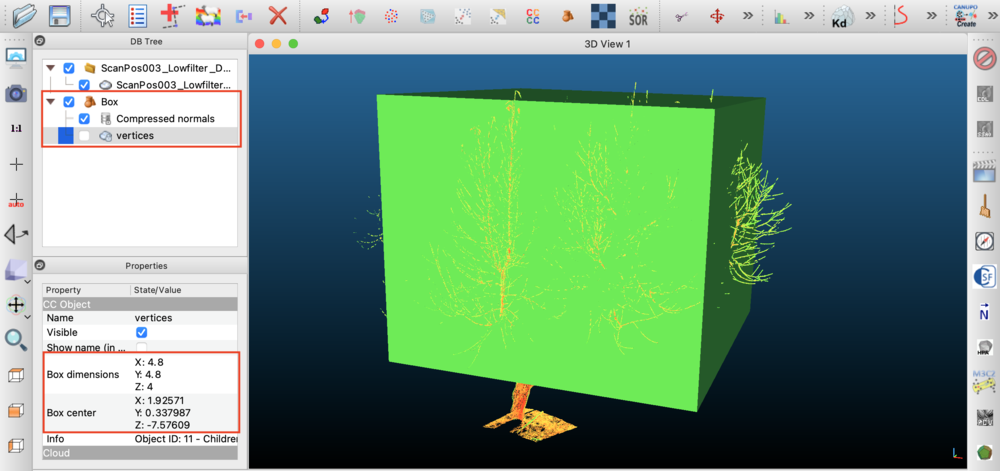
One way to figure out the appropriate dimension and position of the voxel grid is using the Visualizer and trial-and-error. Make a guess of the voxel parameters, then visualize the point cloud and voxels together and adjust accordingly. This can be tedious and time-consuming because you need to re-run the entire code each time.
An often faster way to figure out the dimensions of the voxel grid is to use point cloud visualization software such as Cloud Compare. Load the point cloud data into Cloud Compare, then add a Box (file->Primitive Factory). You can translate or rotate the box by clicking on the Box object in the DB Tree pane, then select the menu item Edit->Translate/Rotate. To change the box size, click on the box vertices in the DB Tree pane, then go to Edit->Multiply/Scale. You can then find the resulting box location and dimensions in the Properties pane.
A triangulation between adjacent points is typically required for any of the available data processing algorithms. In the triangulation, adjacent hit points are connected to form a mesh of triangular solid surfaces. The algorithm for performing this triangulation is described in detail in Bailey and Mahaffee (2017a).
There are two possible options to be specified when performing the triangulation. A required option is \(L_{max}\), which is the maximum allowable length of a triangle side. This parameter prevents triangles from connecting adjacent leaves (i.e., we only want triangles to be formed with neighboring points on the same leaf). Typically we want \(L_{max}\) to be much larger than the spacing between adjacent hit points, and much smaller than the characteristic length of a leaf. For example, Bailey and Mahaffee (2017a) used 5cm for a cottonwood tree.
Another optional parameter is the maximum allowable aspect ratio of a triangle, which is the ratio of the length of the longest triangle side to the shortest triangle side. This has a similar effect as the \(L_{max}\) parameter, and works better in some cases.
The following code sample illustrates how to perform a triangulation.
After triangulation, getTriangleCount() returns the number of triangles, and getTriangulationStats() returns a diagnostic dictionary (candidates, dropped_lmax, dropped_aspect, dropped_degenerate) that tells you whether a sparse mesh is data-limited (few candidates) or filter-limited (many candidates dropped by Lmax/aspect).
Using the triangulation and defined grid cells, the plugin can calculate the leaf area (and leaf area density) for each grid cell. The algorithm for calculating leaf area is described in detail in Bailey and Mahaffee (2017b) (except that in the current implementation, weighting by the sine of the scan zenith direction has been removed).
Performing the calculations is simple and requires no inputs. Note that the leaf area calculation requires that the triangulation has been performed beforehand. If no triangulation is available, the plugin will assume a uniformly distributed leaf angle orientation ( \(G=0.5\)). The leaf area calculation also requires that at least one grid cell was defined.
The leaf area calculation requires that the point cloud contains "miss" points: fired pulses that did not intersect any object and reached the sky. Misses count the laser beams transmitted through each voxel, which is the denominator of the transmission-probability inversion; without them the inversion is ill-posed, so calculateLeafArea() will raise an error if no misses are present. Many scanners do not record a hit point for a miss, so the misses must be supplied either by importing a scan format that retains them or by synthesizing them with the gapfillMisses() method (which infers the sky/miss directions from the recorded returns). Misses are flagged with the per-hit is_miss data field (1 = miss, 0 = return), which is set automatically by gapfillMisses() and by syntheticScan() with record_misses=True, and is carried through when present in imported data. Use hasMisses() to check whether the cloud contains misses before running the inversion. **If you are importing real scan data, see Miss points (transmitted beams) and how to export them for how to export your data from common instrument software (RIEGL, Leica, FARO, etc.) so that the misses — or the row/column/timestamp information needed to reconstruct them — are retained.**
gapfillMisses() reconstructs the empty cells of the scan grid using one of two strategies, selected automatically per scan based on the data attached to the returns:
row and column hit data; preferred when both row/column and timestamp data are present). The native scan-grid indices give the 2D theta/phi raster directly. A robust per-row generative model is fit from the returns (per-row median zenith and a robust Theil-Sen azimuth fit), so the reconstruction does not require the scan to be perfectly level or regular and does not require timestamps. The row/column indices are read from the ASCII columns of the same name.timestamp data but not row/column). The scan grid is reconstructed by sorting returns by timestamp and detecting sweep boundaries from the angular sequence, then interpolating/extrapolating along the inferred sweeps.If a scan's returns carry neither row/column nor timestamp data, gapfillMisses() raises an error, since there is no information from which to reconstruct the miss directions. (A scan containing no returns at all is skipped gracefully.)
Example leaf area calculation:
In addition to the leaf-area point estimate, the plugin can quantify the statistical sampling uncertainty of the per-voxel leaf area density (LAD), following Pimont et al. (2018). Each voxel is sampled by a finite number \(N\) of beams, so the transmittance statistic used in the inversion has sampling variance that depends on \(N\), the optical depth, the spread of beam path lengths, and the size of the vegetation elements.
In PyHelios, uncertainty is computed by passing both a min_voxel_hits value and an element_width (a characteristic vegetation element width in meters, e.g. mean leaf width) to calculateLeafArea(). If a non-positive element_width is passed, the element-position variance term is omitted and the reported uncertainty is sampling-only. The leaf-area point estimate is identical regardless of this argument.
Gtheta). The standard inversion uses triangulation only to estimate the per-voxel mean leaf-projection coefficient \(G(\theta)\). For scans that cannot be triangulated — chiefly moving-platform scans (Moving-platform (mobile/airborne) scans) — pass an explicit Gtheta (in \((0,1]\); use 0.5 for a spherical/random leaf-angle distribution) to calculateLeafArea() along with min_voxel_hits and element_width. This selects a beam-origin-aware inversion that does not require triangulateHitPoints() and is geometrically correct for a scanner that moved during acquisition. It still requires miss points like the other overloads.Gtheta also accepts a sequence with one value per grid cell, in grid-cell order (the order of getCellCenter()), for a canopy whose leaf-angle distribution varies in space — typically with height. Its length must equal getGridCellCount() and every value must be in \((0,1]\); both are checked before the inversion runs. Like the single-value form it needs no triangulation and still requires miss points.Single-voxel confidence intervals are routinely \(\pm 50\)– \(100\%\) and are only valid in specific \((L, L_1, N)\) ranges (Pimont et al. 2018, Table 3); the accessors refuse to emit an interval outside that envelope (the valid flag is then False). The recommended path is the group-scale interval (getGroupLADConfidenceInterval()), which aggregates over a set of voxels (a vertical slice, a whole plant) and yields much tighter intervals ( \(\pm 5\)– \(10\%\)).
The per-voxel sufficient statistics are also available individually via getCellBeamCount(), getCellRelativeDensityIndex(), getCellMeanPathLength(), and getCellLADVariance() (the sampling variance of LAD in \((1/m)^2\), or \(-1\) where undefined).
A leaf-by-leaf reconstruction can be performed for the plant of interest using the method described in Bailey and Ochoa (2018). The reconstruction utilizes the triangulation and leaf area computations to ensure the correct leaf angle and area distributions on average, and thus requires that these routines have been run before performing the reconstruction.
There are two types of available reconstructions:
leafReconstructionAlphaMask(), addReconstructedTriangleGroupsToContext(), addLeafReconstructionToContext(), trunkReconstruction()) are not yet wrapped in the current PyHelios implementation. For now, use the C++ API for reconstruction operations. Note that PyHelios does provide addTrianglesToContext(), which adds the triangulated mesh to the Context as triangle primitives.The LiDAR plugin can simulate single-return and multi-return measurements based on the geometry in the Context. Ray-tracing is used to simulate the emission of radiation from the instrument, and based on ray-object intersection tests with primitive geometry in the model domain, the simulated hit points can be determined. Both the rectangular raster and spinning multibeam scan patterns are supported (see Rectangular raster scan pattern and Spinning multibeam scan pattern). Note that the simulated output consists of discrete return points; Helios does not generate or store a digitized waveform (see Single-return vs. multi-return LiDAR data).
To simulate single-return data, each laser pulse is modeled by a single ray emanating from the scanner origin. Rays are launched according to the scan parameters currently specified in the LiDARCloud. After calling the appropriate synthetic scan generation function, the simulated scan data will be added to the LiDARCloud as if it was imported from real LiDAR data. In addition to the (x,y,z) location of the ray intersection, the model also produces estimates of return intensity, deviation, and can return an identifier for the intersected object.
The synthetic return intensity is computed as \(I = \rho\,\cos\theta\), where \(\rho\) is the per-primitive reflectivity (primitive data reflectivity_lidar, default 1) and \(\theta\) is the angle between the laser beam and the surface normal at the hit point. The intensity reported by Helios is range-normalized: the \(1/R^2\) geometric loss that a real instrument's return amplitude incurs over the scanner-to-target range \(R\) is normalized out, so a given surface produces the same intensity regardless of how far it is from the scanner. The model does not currently include atmospheric attenuation, transmitted-pulse energy, detector gain, leaf transmittance, or multiple scattering. If the ASCII_format of the scan includes the reflectance tag, the scanner additionally records the return reflectance in decibels, \(10\,\log_{10}|I|\), relative to a perfect Lambertian reflector at normal incidence (0 dB).
For multi-return data simulation, multiple sub-rays are cast for a single laser beam pulse, spread over the beam divergence cone and (if a finite exit_diameter is given) the exit aperture. Each sub-ray carries a Gaussian footprint weight \(w=\exp(-2(r/r_0)^2)\) set by its offset \(r\) from the beam axis, so the beam has the Gaussian transverse irradiance profile of a real laser rather than a uniform "top-hat". The sorted sub-ray hits of a pulse are treated as an analytic sum-of-Gaussians waveform from which discrete returns are detected:
setScanPulseWidth(), or the pulse_distance_threshold argument when the pulse width is 0) merge into a single return at the energy-weighted range. Two surfaces within one pulse width therefore blend into one intermediate-range "ghost"/"mixed pixel" point.setScanDetectionThreshold()) is discarded, modeling the noise floor of a real instrument.setScanReturnMode(scanID, ReturnMode.SINGLE)) at most getScanMaxReturns() returns per pulse are reported, chosen by the scan's SingleReturnSelection policy; in multi-return mode (the default) every surviving return is reported.The model also records the target count, target index, timestamp, and an echo_width (pulse range-extent in quadrature with the merged-surface range spread) for each hit point. Note that single-return waveform mode is no cheaper than multi-return — the full sub-ray bundle is still traced; only the idealized one-ray-per-pulse mode (rays_per_pulse omitted) avoids the bundle.
The return mode can also be chosen per syntheticScan() call via the return_mode argument, which overrides each scan's stored mode for that call only:
Per-hit synthetic data values (intensity, distance, timestamp, target_index, target_count, deviation, echo_width, nRaysHit, plus any primitive-data labels listed in the scan's column_format) can be queried after the scan with getHitData() (guard with doesHitDataExist()), or bulk-exported for all hits with getHitDataAll(label). For large clouds (millions of points) prefer the NumPy bulk exports, which pull a whole field across a single FFI call: getHitsXYZRGBArrays() (returns (N,3) float32 coordinates and colors), getHitDataArray(label) ((N,) float32, NaN where the label is absent), getHitScanIDArray() ((N,) int32), and getHitMissArray() ((N,) int32, 1 = miss). For the fastest whole-field scalar read, getHitDataColumn(label) / getHitDataColumnArray(label) use the native cache-linear columnar path and return full float64 precision (with an absent_value placeholder where the label is absent for a hit) rather than the float32 of getHitDataAll/getHitDataArray.
initializeCollisionDetection(context).To generate synthetic single-return LiDAR data, first add all desired model geometry to the Context. Then create a LiDARCloud instance and load an XML file containing the scan parameters (or define the scan in code with addScan()/addScanSpinning()). As in the case of importing a real point cloud dataset, the XML file must specify the scan origin and the scan resolution at a minimum. However, for synthetic data generation, you will not specify a filename to read containing point cloud data, as this data will be generated by the simulation. You can optionally specify the ASCII_format tag, which will determine which additional data fields should be recorded for each hit point.
If no ASCII_format tag is provided in the XML file, the default is to record the (x,y,z) position of the hit point. Note that you can add multiple <scan></scan> blocks in a single XML file to perform multiple scans.
Once the scan parameters have been defined, a single-return synthetic scan is performed by calling syntheticScan(context) without the optional rays_per_pulse and pulse_distance_threshold arguments.
syntheticScan(context) call records miss points (transmitted beams) by default (record_misses=True), so the resulting cloud can be fed directly to calculateLeafArea(). This differs from the C++ syntheticScan(context) convenience overload, which does not record misses. To produce a returns-only single-return cloud (e.g. for triangulation or plant reconstruction, which do not need misses), pass record_misses=False. See Recording miss points in a synthetic scan for details.Example XML file for single-return synthetic scanning:
Example Python code for single-return synthetic scanning:
Generation of synthetic multi-return data is similar to single-return, except that additional information is needed to define the scan and simulation. In the XML file (or addScan() call), the user must specify the diameter of the laser beam at the scan origin using the <exitDiameter> tags (exit_diameter), as well as the angle of beam divergence in radians using the <beamDivergence> tags (beam_divergence). If the exit diameter value is not specified, the default value of 0 is used, which means that the model will revert to single-return data generation. If the beam divergence value is not specified, a default beam divergence of 0 is assumed, which effectively means the beam will remain perfectly cylindrical with diameter of exitDiameter.
Running the multi-return synthetic data generation requires two additional parameters:
rays_per_pulse): Sets the maximum possible number of hits per pulse. Specifying 1 ray/pulse effectively creates a single-return simulation. Ideally, you want a large number of rays/pulse because it allows for more hits/pulse if needed and results in more accurate simulations. The drawback is that simulations take longer to run. A value on the order of 100 is usually reasonable.pulse_distance_threshold): For each simulated laser pulse, the rays/pulse are launched from the scan origin. When some or all of those rays intersect the same surface, they will record a slightly different distance for each ray. Similar distances, which are presumed to lie on the same surface, are aggregated into a single hit point if they are within this distance threshold of each other. Specifying too small of a distance threshold may result in many duplicate hit points on the same surface. Specifying too large of a threshold may result in hit points that lie in between two disconnected surfaces. A threshold value that is smaller than the leaf or branch width is usually reasonable.Example XML file for multi-return synthetic data:
Example Python code for multi-return synthetic scanning:
Synthetic hit points can be labeled based on the primitive they intersect via the value of the primitive data "object_label" of type int. In order to enable synthetic data labeling, the column "object_label" must be included within the scan's column format (<ASCII_format> tag or the column_format argument).
calculateLeafArea(), which requires misses (see Miss points (transmitted beams) and how to export them). If you are generating synthetic data in order to run the leaf-area inversion — the most common reason to do so — you must turn miss recording on.In PyHelios, miss recording is controlled by the record_misses argument of syntheticScan(), which is honored by both the single-return path (rays_per_pulse omitted) and the multi-return path (rays_per_pulse specified), and defaults to True. When enabled, the misses are recorded directly along their true fired-beam directions, each flagged with is_miss=1, so no grid reconstruction (gapfillMisses()) is needed — and this is the only way to obtain misses for non-raster patterns such as spinning multibeam. The companion scan_grid_only argument is an independent memory optimization (it restricts recording to rays that intersect the voxel grid) and can be left False.
record_misses=False. It is specifically the leaf-area (gap-fraction) inversion that needs them.By default, synthetic hit points lie exactly on the surface that the ray intersects. Real LiDAR instruments have finite measurement precision, so each recorded point contains random error. This error is anisotropic — it does not scatter equally in all three Cartesian directions — and is naturally decomposed into two components that act along orthogonal axes of the per-point error ellipsoid:
The two components are configured independently. In the Python API they are set with the range_noise_stddev (meters) and angle_noise_stddev (radians) arguments to addScan()/addScanSpinning()/addScanMovingRaster(); in an XML scan file they are the <rangeNoiseStdDev> and <angleNoiseStdDev> tags. Typical terrestrial laser scanner range precision is on the order of 0.002–0.012 m. Misses are not perturbed by either term. If a value is 0 (the default), that component is disabled; with both disabled, points lie exactly on the surface. The appropriate magnitudes should be taken from the instrument datasheet. The stored noise standard deviations can be queried with getScanRangeNoiseStdDev() and getScanAngleNoiseStdDev().
For example, to emulate an instrument with a 3 mm range precision and 0.2 mrad pointing jitter via XML:
The same scan defined in code:
context.seedRandomGenerator(seed) before syntheticScan() to obtain reproducible noisy scans.A global scanner tilt away from plumb can also be modeled with the scan_tilt_roll / scan_tilt_pitch arguments (radians) of addScan(), or the <scanTilt> XML tag (degrees) — see Scan Metadata. (Static tilt does not apply to moving or spinning scans, whose attitude comes entirely from the trajectory and boresight.) The stored values can be read back with getScanTiltRoll() and getScanTiltPitch().
Results can be visualized using the Visualizer plugin for Helios. There are two possible means for doing so. First, is to add the relevant geometry to the Context (e.g. with addTrianglesToContext()), then visualize primitives in the Context using the Visualizer. This works for the triangulation and plant reconstructions, but cannot be used to visualize just the point cloud since there is no "point" primitive in the Context.
The second option, in the C++ API, is to add geometry directly to the Visualizer using the LiDAR plugin's addHitsToVisualizer(), addGridToVisualizer(), and addTrianglesToVisualizer() functions.
addHitsToVisualizer(), addGridToVisualizer(), addTrianglesToVisualizer()) are not yet wrapped in the current PyHelios implementation. For visualization, add the triangulated mesh to the Context with addTrianglesToContext() and visualize the Context, export point clouds and use external tools like Cloud Compare, or use the C++ API.Results of data processing can be easily written to file for external analysis. The following table lists available export methods. Data is written to an ASCII text file, where each line in the file corresponds to a different data point (e.g., hit point, triangle, etc.).
| Method | Description |
|---|---|
| exportPointCloud(filename, write_header=True) | Write the entire point cloud to ASCII file (usually only used for generated synthetic data). A #-prefixed column header is written by default; pass write_header=False to suppress it. |
| exportScans(filename) | Write an XML metadata file describing all scans plus one ASCII point cloud file per scan (auto-named <base>_<scanID>.xyz). The XML can be re-loaded with loadXML(). |
| exportTriangleNormals(filename) | Write the unit normal vectors [nx ny nz] of all triangles formed from triangulation. |
| exportTriangleAreas(filename) | Write the areas of all triangles formed from triangulation. |
| exportLeafAreas(filename) | Write the leaf area contained within each voxel. |
| exportLeafAreaDensities(filename) | Write the leaf area density of each voxel. |
| exportLeafAreaUncertainty(filename) | Write the per-voxel leaf-area inversion sampling uncertainty (columns: cell_index leaf_area beam_count I_rdi LAD_std_error ci_valid). Requires calculateLeafArea() to have been run with an element_width. |
| exportGtheta(filename) | Write the G(theta) leaf-angle projection value for each voxel. |
Example of writing results to file:
A point cloud of tens of millions of returns is dominated by two costs: the steady-state storage of the hit points and their scalar-data columns, and the transient of growing those arrays. Growing by repeated insertion reallocates geometrically, and during every reallocation the old and new buffers are both live — for a large cloud that transient is gigabytes on top of the steady-state cost, and on Windows it is charged against the system commit limit at allocation time, so a load that would comfortably fit once settled can still fail while growing.
reserveHitPoints() removes the transient entirely by reserving the hit array and every scalar-data column at once. It only reserves capacity: no hit points are created and getHitCount() is unchanged. Reserving less than the eventual total is harmless, as is reserving more.
estimateHitPointMemory() reports the resident bytes a cloud of a given size will occupy. Each stored point costs the size of a hit point plus, for every scalar-data label the cloud carries, one double of value and one byte of presence — the columnar store is dense, so every label costs on every point. It is most accurate once at least one point exists, since it reads the labels created so far.
setMaxHitPoints() caps the number of stored hit points. Exceeding the cap raises an error naming the projected point count and the limit, rather than throwing from inside the allocator where neither the scan responsible nor the size is visible. The default of 100 million is deliberately generous — it guards against a mis-specified scan grid exhausting the machine, and is not a statement about machine capacity. Raise it when the machine genuinely has the memory, or pass 0 to disable the check.
| Method | Description |
|---|---|
| reserveHitPoints(hit_count) | Reserve capacity for hit points and every scalar-data column |
| estimateHitPointMemory(hit_count) | Estimated resident bytes for a cloud of that size |
| setMaxHitPoints(max_hits) | Cap on stored hit points; 0 disables the check |
| getMaxHitPoints() | Current cap |
| getDefaultMaxHitPoints() | Default cap (100 million) |
A miss synthesized by gapfillMisses() through the row/column path is a pure function of its scan-grid cell, so it is stored implicitly — a per-cell occupancy bit plus a scan-wide angular model — rather than as an element of the hit array. Such points are counted by getHitCount() and readable through every accessor, but occupy no per-point storage. This is what makes gap-filling a fine scan grid affordable.
The virtualization is invisible except in two respects.
First, read the cloud back through the bulk accessors. Resolving a virtualized miss by index requires locating its scan and row and then scanning that row's occupancy bits, which is O(Nphi) per call. getHitXYZColumn() and getHitScanIDColumn() walk each scan's occupancy bitset in row-major order — which is index order — so every hit costs O(1). The existing bulk readers (getHitsXYZRGB(), getHitScanIDArray(), getHitMissArray(), getHitDataArray()) already take this path; a Python loop over the per-index getters does not.
Second, materializeMisses() converts every virtualized miss into a stored hit point. Every observable is unchanged by this — it trades the memory saving for real storage — and it happens automatically before any operation that renumbers the hit index space (adding or deleting a hit point, writing hit data or a grid cell), so calling it explicitly is only needed to pay that cost at a chosen moment.
gapfillMissesCount() does the same work as gapfillMisses() but returns only the number of points added, skipping the position vector that gap-filling a fine grid would otherwise allocate and most callers discard.
| Method | Description |
|---|---|
| gapfillMissesCount(scanID=None, ...) | Gapfill and return only how many points were added |
| getVirtualMissCount() | Misses currently held in virtualized form |
| hasVirtualMisses() | Whether any virtualized miss exists |
| materializeMisses() | Convert virtualized misses into stored hit points |
| getHitXYZColumn() | Every hit position in index order, in one pass |
| getHitScanIDColumn() | Every hit scan ID in index order, in one pass |
| getScanGridDirection(scanID, row, column) | Beam direction at a grid cell, from the fitted model |
getScanGridDirection() requires that gapfillMisses() has already run on the scan through the row/column path, since that is what fits the angular model. It raises otherwise.The equal-weighting inversion counts, per pulse, the returns inside and beyond each voxel it pierces. Those counts come from the returns present in the cloud, so deleting a pulse's later returns (cropping to the voxel grid, removing the ground, keeping one class of points) leaves its surviving in-voxel return as the whole beam: a pulse that was three-quarters transmitted reads as fully intercepted, and LAD comes out high.
calculateLeafArea() closes that gap when the surviving returns still carry the per-pulse target_index and target_count the scanner wrote. A pulse's returns are ordered by range and a beam crosses the (convex) grid in one contiguous segment, so the removed returns can be placed from the surviving indices alone:
The placement is exact when the cloud was cropped to the grid's extent. A cloud cropped inside the grid (a class filter, say) produces ambiguous returns, and a removed return that actually sat inside the same voxel as the last survivor is placed beyond it – the inversion cannot tell, so check the tally. A stand-in miss (a return flagged is_miss sharing the pulse's timestamp, which a cropping tool may emit for the removed energy) is ignored for counting when the inference applies; its geometry still sets the beam direction.
Pulses whose returns lack either column, or whose declared count matches the returns present, are untouched. Misses grouped alone – gap-filled or recorded – are unaffected.
| Method | Description |
|---|---|
| getCroppedReturnStats() | What the last inversion inferred from target_count: returns placed before / beyond the grid, or unplaceable |
The leaf-area inversion bins per-beam voxel path lengths once a voxel accumulates many samples, which bounds memory that would otherwise grow without limit with scan size. Binning recovers the extinction coefficient far inside the solver's tolerance, so the default is appropriate for essentially all data. setExactPathLengths(True) keeps every sample instead — an escape hatch for unusual geometry, or for confirming that binning is not responsible for a difference between two results.
| Method | Description |
|---|---|
| setExactPathLengths(exact) | Keep every path-length sample instead of binning |
| getExactPathLengths() | Whether samples are kept exactly |
The PyHelios LiDARCloud binding covers the full standard workflow — scan definition (raster, spinning multibeam, moving-platform, and physical-parameter spinning/moving-raster, with noise and tilt), scan-mode introspection (getScanMode(), getScanStepsPerRev(), getScanRotationRate(), getScanRevolutions()), analytic-waveform return-mode configuration (setScanReturnMode()/setScanMaxReturns()/setScanSingleReturnSelection()/setScanPulseWidth()/setScanDetectionThreshold() and the syntheticScan(return_mode=...) override), hit-point import/bulk-add, columnar bulk reads (getHitDataColumn()/getHitDataColumnArray()), miss handling (gapfillMisses(), gapfillMissesCount(), virtualized-miss introspection, synthetic record_misses), memory budgeting (reserveHitPoints(), estimateHitPointMemory(), setMaxHitPoints()), one-pass columnar hit readers (getHitXYZColumn(), getHitScanIDColumn()), path-length accumulation mode (setExactPathLengths()), grid definition including terrain-following columns (addGrid(column_z_offsets=...)) and cell queries (getCellCenter(), getCellSize(), getCellRotation()), triangulation, leaf-area inversion with uncertainty/confidence intervals, G(theta), GPU control, and all of the file-export routines above.
The following C++ features are documented in the native LiDAR plugin but not yet wrapped in PyHelios. For these, use the C++ API:
leafReconstructionAlphaMask(), addReconstructedTriangleGroupsToContext(), addLeafReconstructionToContext(), trunkReconstruction()addHitsToVisualizer(), addGridToVisualizer(), addTrianglesToVisualizer()setProgressCallback() (per-scan progress reporting; not wrapped because it requires a C callback trampoline across the FFI boundary)exportPointCloudPTX() (PTX format), loadASCIIFile() (direct ASCII loading without XML), loadTreeQSM()exportTriangleInclinationDistribution(), exportTriangleAzimuthDistribution()getScanRangeTheta(), getScanRangePhi(), getScanBeamExitDiameter(), getScanBeamDivergence(), getGridBoundingBox() 1.13.2