 |
1.3.82
|

| |
|
1.3.82
|
|
| |
Known Issues
| Dependencies | None |
|---|---|
| CMakeLists.txt | set( PLUGINS "plantarchitecture" ) |
| Header File | include "PlantArchitecture.h" |
| Class | PlantArchitecture |
| Constructors |
|---|
| PlantArchitecture( helios::Context* ) |
| Object Data Label | Data Type | Description |
|---|---|---|
| plantID | int | Object ID of plant the primitive belongs to (used for image labeling). |
| plant_name | string | Name of the plant species/model (e.g., "almond", "tomato"). |
| plant_type | string | Type/species of the plant as defined in the PlantLibrary. |
| plant_height | float | Current height of the plant. |
| phenology_stage | int | Current phenological stage of the plant (e.g., vegetative, flowering, fruiting, senescent). |
| leafID | int | Object ID of leaf the primitive belongs to (used for image labeling). |
| peduncleID | int | Object ID of peduncle the primitive belongs to (used for image labeling). Not defined if there are no peduncles. |
| closedflowerID | int | Object ID of flower (closed) the primitive belongs to (used for image labeling). Not defined if there are no closed flowers. |
| openflowerID | int | Object ID of flower (open) the primitive belongs to (used for image labeling). Not defined if there are no open flowers. |
| fruitID | int | Object ID of fruit the primitive belongs to (used for image labeling). Not defined if there are no fruits. |
| rank | int | Rank of shoot object belongs to. |
| age | float | Age of the organ that the object belongs to (e.g., a leaf). |
| carbohydrate_concentration | float | Concentration of carbohydrates in the shoot (mol C/m³). Value is constant along the shoot, and zero for non-internode organs. |
| leaf_area | float | Total leaf area associated with the shoot (m²). |
| nitrogen_stress_factor | float | Nitrogen stress factor (0-1) calculated by the nitrogen model. Written to plant objects. 1.0 = no stress, 0.0 = severe stress. Only present when nitrogen model is enabled. |
| leaf_nitrogen_gN_m2 | float | Leaf nitrogen content per unit area (g N/m²). Written to leaf objects. Only present when nitrogen model is enabled. |
To enable optional output object data, use:
You can also enable multiple fields at the same time:
or enable them all by passing the string "all":
This plug-in provides a generalized framework for creating dynamic procedural plant models for a very wide range of species. The plug-in comes with a library of a number of different plant models, which have a common set of parameters that can be adjusted by the user. Parameters defining the plant can be set to constant values, or randomized based on a number of different distributions. The plant model can be grown over time, and will transition through different phenological stages such as dormancy, flowering, fruit set, and senescence. Users can also create their own plant models by changing model parameters, or build custom plants branch-by-branch.
The methodology behind the plant architecture model is described in the technical report found here: http://arxiv.org/abs/2512.17966
The next section provides information on how to load existing models from the library and grow them over time, which is likely how most users will interact with the plug-in. The following sections provide more detailed information on the parameters that define the plant model, the structure of the plant model, and how to modify parameters of existing models or create custom plant models from scratch.
A number of plant models are available in the plant architecture library, which can be created based on default parameters, or parameters modified by the user. Plant models available in the library are given in the table below.
| Plant Type/Species | Variety/Variation | Plant type string argument | Shoot types |
|---|---|---|---|
| Almond Tree (Prunus dulcis) | Nonpareil | "almond" | trunk, scaffold, proleptic |
| Apple Tree (Malus pumila) | Fuji | "apple" | trunk, proleptic |
| Bindweed (Convolvulus arvensis) | generic | "bindweed" | base, offshoots, children |
| Butter Lettuce (Lactuca sativa) | generic | "butterlettuce" | mainstem |
| Capsicum Pepper (Capsicum annuum) | generic | "capsicum" | mainstem |
| Cheeseweed (Malva neglecta) | generic | "cheeseweed" | mainstem |
| Common Bean (Phaseolus vulgaris) | upright growth habit (determinate) | "bean" | unifoliate, trifoliate |
| Cowpea (Vigna unguiculata) | upright growth habit (determinate) | "cowpea" | unifoliate, trifoliate |
| Eastern Redbud (Cercis canadensis) | generic | "easternredbud" | eastern_redubud_trunk, eastern_redbud_shoot |
| Grapevine (Vitis vinifera) | VSP trellis | "grapevine_VSP" | grapevine_trunk, grapevine_cane, grapevine_shoot |
| Grapevine (Vitis vinifera) | Wye trellis (quadrilateral) | "grapevine_Wye" | grapevine_trunk, grapevine_cordon, grapevine_shoot |
| Ground Cherry (Physalis philadelphica) | generic | "groundcherryweed" | mainstem |
| Maize (Zea mays) | generic | "maize" | mainstem |
| Olive Tree (Olea europaea) | generic | "olive" | trunk, scaffold, proleptic |
| Pistachio Tree (Pistachia vera) | generic | "pistachio" | trunk, proleptic |
| Puncturevine (Tribulus terrestris) | generic | "puncturevine" | base, offshoots, children |
| Rice (Oryza sativa) | generic | "rice" | mainstem |
| Sorghum (Sorghum bicolor) | grain sorghum | "sorghum" | mainstem |
| Soybean (Glycine max) | upright growth habit (determinate) | "soybean" | unifoliate, trifoliate |
| Strawberry (Fragaria × ananassa) | generic | "strawberry" | mainstem |
| Sugar Beet (Beta vulgaris) | generic | "sugarbeet" | mainstem |
| Tomato (Solanum lycopersicum) | determinate growth | "tomato" | mainstem |
| Cherry Tomato (Solanum lycopersicum) | upright trained | "cherrytomato" | mainstem |
| Walnut Tree (Juglans regia) | generic | "walnut" | trunk, scaffold, proleptic |
| Wheat (Triticum aestivum) | generic | "wheat" | mainstem |
Loading a plant from the library with default parameters is relatively simple, and requires only declaring the PlantArchitecture class, loading the model using the PlantArchitecture::loadPlantModelFromLibrary() method (which takes a string argument for the plant model as listed in the table above), and calling the PlantArchitecture::buildPlantInstanceFromLibrary() method. The method takes two arguments: 1) the Cartesian (x,y,z) position of the plant base, and 2) the age of the plant in days. A code example is given below.
This will create a default bean plant that is 45 days old (i.e., 45 days since emergence).
Multiple plants can be created manually by calling the PlantArchitecture::buildPlantInstanceFromLibrary() method multiple times with different base positions. There is also a method available to build a canopy of regularly-spaced plants: PlantArchitecture::buildPlantCanopyFromLibrary().
The plant library supports customizable training system parameters that allow you to specify species-specific architectural features without modifying the source code. These parameters control aspects like trunk height, trellis dimensions, scaffold branch configuration, and other training-related characteristics.
Build parameters are specified as an optional std::map<std::string, float> argument to the build functions:
Build parameters can also be used with the canopy building methods:
Grapevine VSP (grapevine_VSP)
The VSP grapevine model uses vine spacing to automatically calculate appropriate cane length and node counts.
| Parameter | Default | Valid Range | Units | Description |
|---|---|---|---|---|
| vine_spacing | 2.4 | 0.5-5.0 | m | Plant-to-plant spacing (cane nodes auto-calculated to span half this distance) |
| trunk_height | 0.1 | 0.05-1.0 | m | Total trunk height |
Grapevine Wye (grapevine_Wye)
The Wye grapevine model parameters control the trellis system geometry.
| Parameter | Default | Valid Range | Units | Description |
|---|---|---|---|---|
| trunk_height | 0.165 | 0.05-1.0 | m | Total trunk height |
| cordon_spacing | 0.6 | 0.2-2.0 | m | Spacing between cordon rows (fruiting wires) |
| vine_spacing | 1.8 | 0.5-5.0 | m | Plant-to-plant spacing along row |
| catch_wire_height | 2.1 | 0.5-4.0 | m | Absolute height of catch wires |
Tree Species (almond, apple, walnut, pistachio)
Tree species use a simplified height-based training system. The code automatically calculates trunk node counts based on species-specific internode lengths (almond: 3cm, apple: 4cm, walnut: 4cm, pistachio: 5cm).
| Parameter | Default | Valid Range | Units | Description |
|---|---|---|---|---|
| trunk_height | 0.6-1.0* | 0.1-3.0 | m | Total desired trunk height |
| num_scaffolds | 4 | 2-8 | - | Number of scaffold branches |
| scaffold_angle | 40-50* | 20-70 | deg | Scaffold branch angle from vertical |
Default values: almond/apple: 0.6m trunk, 40° scaffolds; walnut: 0.8m trunk, 50° scaffolds; pistachio: 1.0m trunk, 50° scaffolds
All build parameters are validated to ensure they fall within acceptable ranges. If a parameter value is outside the valid range, a helios_runtime_error will be thrown with a clear error message indicating the parameter name, the provided value, and the valid range.
Parameters specified as floats will be automatically cast to unsigned integers where appropriate (e.g., node counts, scaffold counts).
Example 1: Grapevine VSP with Custom Spacing
Example 2: Almond Tree with Custom Training
Example 3: Grapevine Wye with Modified Trellis
The model can be grown over time by calling the PlantArchitecture::advanceTime() method after the plant instance has been created, where the argument to this method is the timestep to advance in days. The timestep value can be larger than the phyllochron, such that multiple phytomers and shoots can be produced in a single call to PlantArchitecture::advanceTime().
Each plant model has a maximum supported age, which is listed in the table of the next section.
Annual plants generally start as seedlings and emerge from the ground at time = 0. Perennial plants typically are a few years old at time = 0, which is generally the point when management training practices (e.g., pruning, heading) have been done and the plant is allowed to grow freely.
Each time PlantArchitecture::advanceTime() is called, the geometry is updated in the Context, which incurs substantial computational cost. Therefore, it is recommended to advance time over the largest increment possible. For example, if growing over 1 year it would not be efficient to call PlantArchitecture::advanceTime() 365 times with a timestep of 1 day, but rather with a single call with timestep of 365 days.
As the plant grows over time, it will transition to different phenological stages such as breaking dormancy, flowering, fruit set, etc. Each model has a default set of values that controls how long it takes to transition to these phenological states. Each state is described in the table below.
| Phenological Threshold | Description |
|---|---|
| time_to_dormancy_break | Time required to break dormancy starting from the time of entering dormancy (or since the start of the simulation if starting dormant). |
| time_to_flower_initiation | Time from emergence/dormancy required to reach flower creation (closed flowers). |
| time_to_flower_opening | Time from flower initiation required to reach flower opening (open flowers). (If flower initiation was skipped, time is relative to emergence/dormancy). |
| time_to_fruit_set | Time from flower opening required to reach fruit set. (If flower opening or initiation was skipped, time is relative to previous phenological stage). |
| time_to_fruit_maturity | Time from fruit set required to reach maturity. (If fruit set was skipped, time is relative to previous phenological stage). |
| time_to_senescence | Time from emergence/dormancy required to reach senescence. At senescence, leaves and fruit will be removed, and the plant will become dormant. |
Default values for each species in the plant library are given in the table below. Values are in units of days.
The phenological cycle starts when the plant enters dormancy, and thus a period of time_to_dormancy_break must pass before the plant starts to actively grow.
| Plant type string argument | time_to_dormancy_break | time_to_flower_initiation | time_to_flower_opening | time_to_fruit_set | time_to_fruit_maturity | time_to_senescence | Age at time = 0 | Maximum age |
|---|---|---|---|---|---|---|---|---|
| "almond" | 165 | -1 | 3 | 7 | 20 | 200 | 3 years | 1825 days (5 years) |
| "apple" | 165 | -1 | 3 | 7 | 30 | 200 | 3 years | 1460 days (4 years) |
| "bean" | 0 | 40 | 5 | 5 | 30 | \(\infty\) | 0 | 365 days (1 year) |
| "bindweed" | 0 | -1 | 14 | -1 | -1 | \(\infty\) | 0 | 50 days |
| "butterlettuce" | 0 | -1 | -1 | -1 | -1 | \(\infty\) | 0 | 365 days (1 year) |
| "cheeseweed" | 0 | -1 | -1 | -1 | -1 | \(\infty\) | 0 | 40 days |
| "cowpea" | 0 | 40 | 5 | 5 | 30 | \(\infty\) | 0 | 365 days (1 year) |
| "easternredbud" | 165 | -1 | 3 | 7 | 30 | 200 | 2 years | 1460 days (4 years) |
| "grapevine_VSP" | 165 | -1 | -1 | 45 | 45 | 200 | 3 years | 365 days (1 year) |
| "maize" | 0 | -1 | -1 | 4 | 58 | \(\infty\) | 0 | 365 days (1 year) |
| "olive" | 165 | -1 | 3 | 7 | 20 | 200 | 3 years | 1825 days (5 years) |
| "pistachio" | 165 | -1 | 3 | 7 | 20 | 200 | 3 years | 1460 days (4 years) |
| "puncturevine" | 0 | -1 | 14 | -1 | -1 | \(\infty\) | 0 | 45 days |
| "rice" | 0 | -1 | -1 | 4 | 10 | \(\infty\) | 0 | 365 days (1 year) |
| "sorghum" | 0 | -1 | -1 | 4 | 35 | \(\infty\) | 0 | 365 days (1 year) |
| "soybean" | 0 | 40 | 5 | 5 | 30 | \(\infty\) | 0 | 365 days (1 year) |
| "sugarbeet" | 0 | -1 | -1 | -1 | -1 | \(\infty\) | 0 | 365 days (1 year) |
| "tomato" | 0 | 40 | 5 | 5 | 30 | \(\infty\) | 0 | 365 days (1 year) |
| "walnut" | 165 | -1 | 3 | 7 | 20 | 200 | 3 years | 1095 days (3 years) |
| "wheat" | 0 | -1 | -1 | 4 | 10 | \(\infty\) | 0 | 365 days (1 year) |
The plant architecture model integrates the Helios collision detection plug-in to enable two primary types of object collision avoidance: 1) "soft" avoidance of other plant organs during growth in order to create a plant structure that generally minimizes collisions with itself and other plants while also tending to fill open space (i.e., space colonization), and 2) "hard" avoidance of solid obstacle objects that should not be intersected like the ground or buildings.
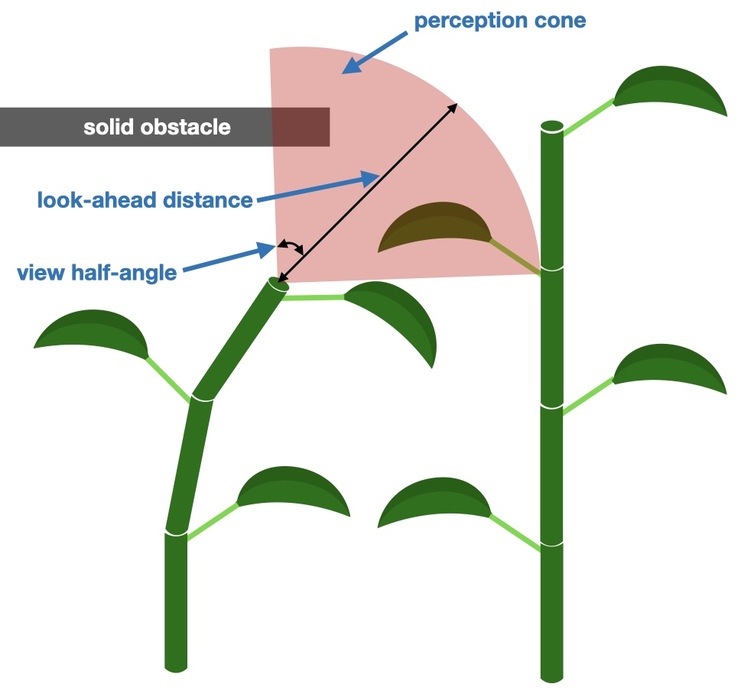
Both types of collision avoidance use the concept of a perception cone at the shoot apex (see figure below). The parameters of the cone are user-defined, which determine the "look-ahead distance" (length of cone axis) and the cone field of view. Ray-tracing calculations are used to determine objects 'sensed' within the cone view. It should be noted that the parameters of the perception cone affects model computational expense. A larger cone will tend to result in reduced performance because more intersection queries will be needed in general. If the cone is too small, model accuracy may be sacrificed because the plant may not adequately perceive obstacles and thus growth may not be appropriately modified.
The collision detection framework utilizes several optimizations to improve performance. It uses OpenMP parallelization to accelerate ray-tracing operations associated with perception cone object detection. It also uses an efficient plant-centric bounding volume hierarchy (BVH) to rapidly cull distant geometry during ray intersection traversals.
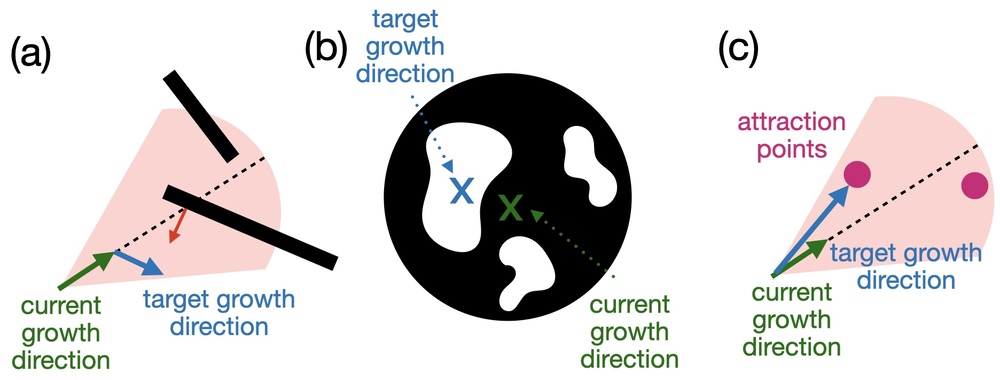
Calling PlantArchitecture::enableSoftCollisionAvoidance() will enable "soft" collision avoidance for internodes, and optionally for petioles and peduncles. The term "soft" here is used because growth will generally tend in a direction that minimizes collisions, but it will not strictly prevent collisions.
When enabled, each time a new internode (or optionally petiole or peduncle) is spawned during growth, a "perception cone" with axis oriented in the initial candidate growth direction is used to determine potential obstacles. A user-defined number of rays are launched from the cone apex toward its base to calculate points of intersection for objects within the cone. The algorithm then uses this information to determine the largest contiguous gap within the cone's view, and a direction vector originating at the cone's base and pointing to the middle of the gap. An "inertia" factor is set that determines how abruptly growth is adjusted toward the gap – a factor of 0.0 sets the new growth direction exactly toward the gap, while a factor of 1.0 does not modify the growth direction. By default, only leaves are considered as obstacles for soft collision avoidance, but other organ types can be optionally enabled, which are accompanied by increased computational cost.
To strictly enforce that plants do not grow into solid boundaries, "hard" boundary collision avoidance can be enabled using PlantArchitecture::enableSolidObstacleAvoidance(). Users define which geometry should be considered as solid boundaries, and the parameters defining the perception cone. Similar to soft object avoidance, solid obstacle avoidance involves launching rays from the perception cone apex toward its base to determine solid obstacles contained in the perception cone. If present, the distance to the solid obstacle closest to the cone apex is determined, along with the normal vector of the obstacle. The new target growth direction is a vector perpendicular to the surface of the object. The strength of the change in growth direction to achieve the target growth direction increases as the plant gets closer to the object. When it gets very near the object, the growth direction is set equal to the target growth direction to ensure that the object will not be hit.
When soft collision avoidance is enabled, depending on the value of the inertia factor, plants may effectively avoid solid boundaries without hard boundary collision avoidance enabled.
When enabling hard boundary collision avoidance, users can optionally enable fruit adjustment based on solid obstacle collisions using the enable_fruit_adjustment parameter. This is useful for large fruit growing near solid obstacles (e.g., large fruit resting on the ground). When this is enabled, fruit are rotated away from the boundary such that a bounding box encompassing the fruit no longer intersects the solid boundaries it was intersecting. Then an iterative refinement procedure rotates the fruit back toward the boundary to get it closer without intersecting it again.
The collision detection system provides several configuration options to optimize performance and behavior:
Collision-Relevant Organs**: Use PlantArchitecture::setCollisionRelevantOrgans() to specify which organ types should participate in collision detection. By default, only leaves are considered to minimize computational cost.
Static Obstacles**: For efficiency, mark geometry that doesn't move during simulation as static using PlantArchitecture::setStaticObstacles().
Advanced Access**: For advanced users, direct access to the internal CollisionDetection instance is available via PlantArchitecture::getCollisionDetection().
Performance Notes**: Collision detection incurs computational expense proportional to scene complexity and perception cone parameters. For compute-intensive plants like trees, consider:
The model also has the ability to detect collisions with the ground plane and clip any organs that intersect the ground using PlantArchitecture::enableGroundClipping(). By default, the ground is assumed to be at a height of 0, but this can optionally be set to any height. This is a legacy feature that is superseded by the more flexible solid obstacle avoidance system described above.
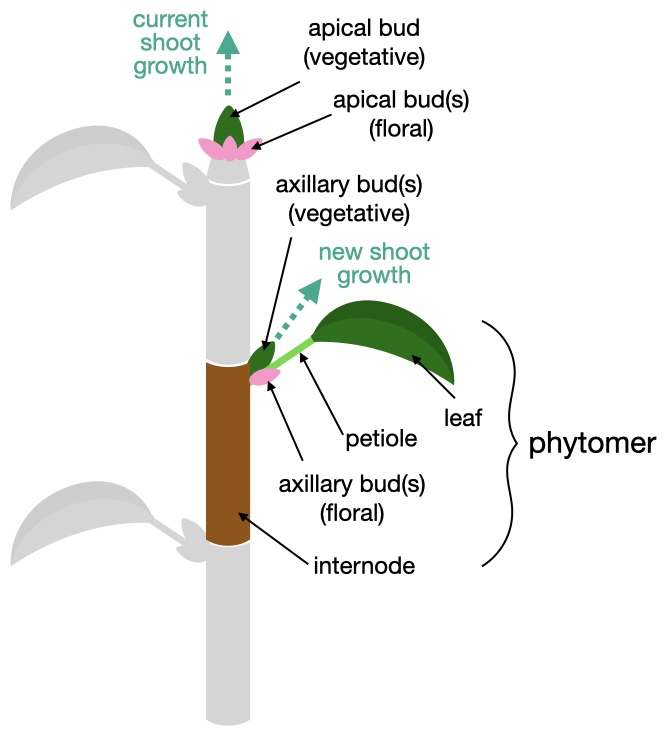
The phytomer is the basic unit of a shoot, and consists of an internode, one or more petioles, leaves, and inflorescence if present. The internode consists of a tube whose base is connected either to a parent shoot if it is the first phytomer along a shoot, or to the end of another phytomer along the same shoot.
A phytomer can have one or more petioles, which are connected at the end of the internode. Each petiole has one or more leaves.
At the tip of a growing shoot (i.e., end of the last phytomer on the shoot), there is an apical vegetative bud that can spawn a new phytomer along the same shoot. This is how shoot growth occurs. During a dormant period, one or more apical floral buds can also be created.
At the base of the petiole, there may be one or more vegetative buds that can develop into a new shoot, and one or more floral buds that can develop into a fruit. The vegetative and floral buds can break into a new shoot/flower in the same growing season, or may need a winter dormancy period before breaking. It is also possible that a bud never breaks and dies. Once a bud breaks it is considered dead.
The coordinate system of plant organs is defined with respect to it's parent element (i.e., element it originated from), with it's default orientation being aligned with it's parent's axis. It can then be rotated based on angles of 'pitch', 'yaw', and 'roll' (in that order):
Pitch: rotation angle formed between the axis of the element and it's parent's axis.
Yaw: rotation angle about the parent's axis (except in the case of a leaf, where it is about an axis perpendicular to the leaf midrib).
Roll: rotation angle about the element's own axis
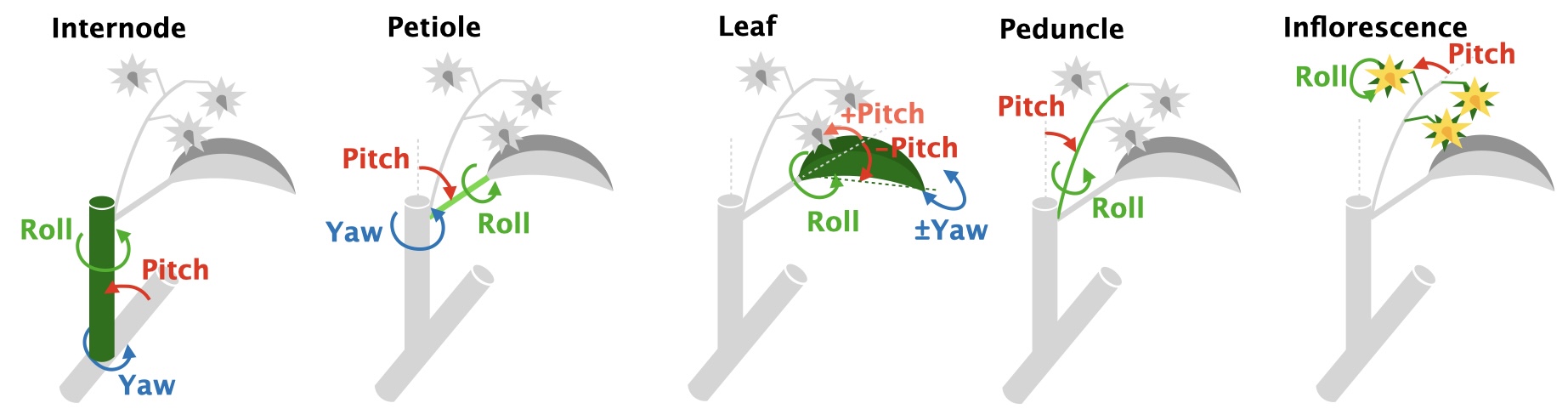
Nearly all parameters in the architectural model can either be specified as a constant value, or as a random variable following several pre-defined distributions.
Parameters that can be randomized have type of RandomParameter_float or RandomParameter_int depending on the parameter value type. If the parameters are assigned a constant value, they are set the same as a regular float or int. The val() method is used to get the value of the parameter.
In order to randomize the variable, member methods can be called to set the distribution type and specify the distribution parameters. It is also required to initialize the variable with a random number generator. It is recommended that this be based on the Context's generator to keep everything consistent. Below is an example.
Available distributions for RandomParameter_float are listed below
| Distribution | Method | Parameters |
|---|---|---|
| Uniform | uniformDistribution() | minimum value, maximum value |
| Normal | normalDistribution() | mean, standard deviation |
| Weibull | weibullDistribution() | shape parameter, scale parameter |
and for RandomParameter_int are:
| Distribution | Method | Parameters |
|---|---|---|
| Uniform | uniformDistribution() | minimum value, maximum value |
| Discrete Values | discreteValues() | vector of discrete int values that will be randomly chosen |
Phytomers are defined by a set of parameters that specify its geometry. These parameters are stored in a data structure called PhytomerParameters. The phytomer parameters are parameters that are generally constant across space and time (aside from randomization), and are usually species-specific.
The table below lists the parameters that define the geometry of the phytomer, and their descriptions. There are some parameters that are notably absent, such as the internode length and radius. Since these parameters vary substantially with age and position along the shoot, these are considered to be parameters of the shoot and not the phytomer. Shoot parameters are described below in Defining Shoots and their Parameters.
| Parameter | Type | Units | Description |
|---|---|---|---|
| — internode — | |||
| pitch | RandomParameter_float | degrees | Angle of the phytomer internode with respect to the previous phytomer along the shoot. Setting this >0 creates a zig-zag shoot. |
| phyllotactic_angle | RandomParameter_float | degrees | Angle between the petioles/buds of two successive phytomers along the shoot. See this page for more information on phyllotaxis. |
| radius_initial | RandomParameter_float | meters | Initial radius of the internode when it is created. |
| max_vegetative_buds_per_petiole | RandomParameter_int | - | Maximum number of possible vegetative nodes per petiole. Some of these buds may not break depending on the vegetative bud break probability. |
| max_floral_buds_per_petiole | RandomParameter_int | - | Maximum number of possible floral nodes per petiole. Some of these buds may not break depending on the flower bud break probability. |
| color | helios::RGBcolor | - | Diffuse color of the internode tube. |
| image_texture | std::string | - | Image texture to map to the internode tube (overrides RGB color). |
| length_segments | uint | - | Number of longitudinal segment subdivisions of the internode tube. |
| radial_subdivisions | uint | - | Number of radial subdivisions segments of the internode tube (e.g., =4 gives a square cross-section; =5 gives a pentagonal cross-section, etc.) |
| — petiole — | |||
| petioles_per_internode | uint | - | Number of petioles emanating from a single internode (e.g., for an 'opposite' growth pattern, = 2) |
| pitch | RandomParameter_float | degrees | Angle of the petiole base axis with respect to its parent phytomer axis. |
| radius | RandomParameter_float | meters | Radius of petiole cross-section. If either radius or length is 0, no petiole geometry is created and leaves attach directly at the internode tip. |
| length | RandomParameter_float | meters | Length of the petiole tube. If either radius or length is 0, no petiole geometry is created and leaves attach directly at the internode tip. |
| curvature | RandomParameter_float | degrees/meter | Curvature angle of the petiole per unit length of petiole. If curvature is positive, petiole curves upward toward vertical. If negative, curvature is downward. |
| taper | RandomParameter_float | - | Ratio between the petiole radius at the tip to the radius at the base (e.g., =1 has no taper, =0 comes to a point at the tip). |
| color | helios::RGBcolor | - | Diffuse color of the petiole tube. |
| length_segments | uint | - | Number of longitudinal segment subdivisions of the petiole tube. |
| radial_subdivisions | uint | - | Number of radial subdivisions segments of the petiole tube (e.g., =4 gives a square cross-section; =5 gives a pentagonal cross-section, etc.) |
| — leaf — | |||
| leaves_per_petiole | uint | - | Number of leaves on each petiole. >1 creates a compound leaf. |
| pitch | RandomParameter_float | degrees | Angle of the leaf axis with respect to its parent petiole axis. |
| yaw | RandomParameter_float | degrees | Rotation angle of the leaf about its base along the plane of its lamina. |
| roll | RandomParameter_float | degrees | Rotation angle of the leaf about it's own axis (midrib). |
| leaflet_offset | RandomParameter_float | - | If a compound leaf (leaves_per_petiole>1), this sets the spacing between adjacent leaflets along the petiole as a fraction of the petiole length. Note that the first two leaves from the tip will be offset from the tip by half this value. |
| leaflet_scale | RandomParameter_float | - | If a compound leaf (leaves_per_petiole>1), this sets the scaling factor of the leaflet moving down the petiole with respect to the previous leaf (<1 scales down, >1 scales up). |
| prototype_scale | RandomParameter_float | - | Scaling factor applied to the leaf prototype. Usually the prototype has unit length, so this sets the physical length of the leaf. |
| prototype | LeafPrototype struct | - | Structure containing information to build leaf prototypes. |
| — peduncle — | |||
| length | RandomParameter_float | meters | Length of the peduncle (inflorescence supporting structure). |
| radius | RandomParameter_float | meters | Radius of the peduncle. |
| pitch | RandomParameter_float | degrees | Angle of the peduncle axis with respect to its parent internode axis. |
| roll | RandomParameter_float | degrees | Rotation angle of the peduncle about it's own axis. |
| curvature | RandomParameter_float | degrees/meter | Curvature angle of the peduncle per unit length of peduncle. If curvature is positive, peduncle curves upward toward vertical. If negative, curvature is downward. |
| color | helios::RGBcolor | - | Diffuse color of the peduncle tube. |
| length_segments | uint | - | Number of longitudinal segment subdivisions of the inflorescence supporting structure. |
| radial_subdivisions | uint | - | Number of radial subdivisions segments of the inflorescence supporting structure (e.g., =4 gives a square cross-section; =5 gives a pentagonal cross-section, etc.) |
| — inflorescence — | |||
| flowers_per_peduncle | RandomParameter_int | - | Number of flowers per peduncle (rachis). |
| flower_offset | RandomParameter_float | - | If peduncle has multiple flowers/fruit (flowers_per_peduncle>1), this sets the spacing between adjacent flowers/fruit along the peduncle as a fraction of the peduncle length. |
| pitch | RandomParameter_float | degrees | Angle of the fruit axis with respect to its parent peduncle axis. |
| roll | RandomParameter_float | degrees | Rotation angle of the fruit about it's own axis (x-axis of fruit prototype). |
| flower_prototype_scale | RandomParameter_float | - | Scaling factor applied to the flower prototype. Usually the prototype has unit length, so this sets the physical length of the flower. |
| flower_prototype_function | function pointer | - | Pointer to a function that generates the flower prototype model. Function takes arguments ( helios::Context*, uint subdivisions, bool flower_is_open ) and returns an object ID (uint). |
| fruit_prototype_scale | RandomParameter_float | - | Scaling factor applied to the fruit prototype. Usually the prototype has unit length, so this sets the physical length of the fruit. |
| fruit_prototype_function | function pointer | - | Pointer to a function that generates the fruit prototype model. Function takes arguments ( helios::Context*, uint subdivisions, float time_since_fruit_set ) and returns an object ID (uint). |
| unique_prototypes | uint | - | Number of unique flower/fruit prototypes to generate per shoot type. If = 0, every leaf will be unique. Increasing this value gives more variability across the plant, but it will take longer to initially generate the plant model. |
The phytomer parameters are stored in a data structure (struct) called PhytomerParameters. This structure has sub-member structs for each of internode, leaf, petiole, and inflorescence, each containing the parameters for that element type as designated in the table above. Below is an example of how to set a few of the parameters:
The figure below provides some examples of how various shoot growth patterns (e.g., alternate, opposite) can be created by varying the model parameters.

The geometry of plant leaves, flowers, and fruit are defined based on 'prototype' models that can be specified in a number of ways. Each time one of these organ types is to be generated in the model, a user-defined function is called to add the geometry. The user can write a function to add a helios::Tile object, a mesh of triangles, load a polygon model from file, or any other desired method.
The size, position, and orientation of the prototype when it is created needs to follow a specific convention.
Flower and fruit OBJ models are usually created in 3rd party software and exported as OBJ files. The Blender project files used to create all the flower and fruit organ models are provided in the directory 'plugins/plantarchitecture/assets/Blender_organ_models'.
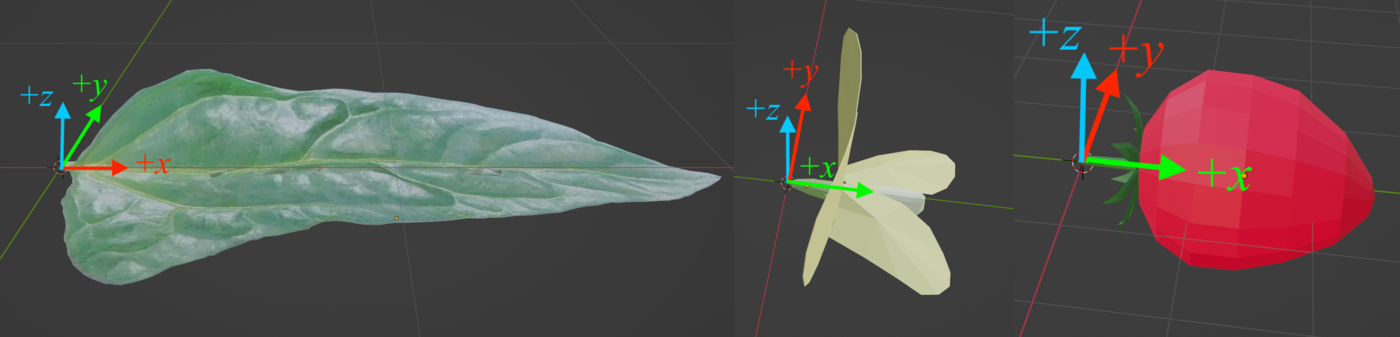
Leaf prototypes can be generated using three primary methods: 1) using the built-in function for procedural leaf generation based on a set of parameters, 2) loading a leaf model from an OBJ file, or 3) creating a leaf manually through Helios Context methods (e.g., helios::Context::addTileObject( const helios::vec3&, const helios::vec2&, const helios::SphericalCoord&, const helios::int2& ) ).
The built-in function for procedural leaf generation generates leaf geometries based on the parameter set given in the table below. The advantage of this approach is that it provides a straight-forward means of representing many leaf morphologies with random variation. The drawback is that if very high leaf detail is needed such as venation patterns, this may require using an OBJ model.
| Parameter | Type | Default | Description |
|---|---|---|---|
| — parameters for procedural parametric leaf generation — | |||
| leaf_texture_file | std::string | Must be specified | Path to the leaf texture image file. |
| leaf_aspect_ratio | float | 1.0 | Ratio of leaf width to leaf length. |
| midrib_fold_fraction | float | 0.0 | Fraction of folding along midrib (=0 leaf is flat, =1 leaf is completely folded in half). |
| longitudinal_curvature | float | 0.0 | Curvature factor along x-direction (lengthwise). (+curves upward, -curved downward) |
| lateral_curvature | float | 0.0 | Curvature factor along y-direction (widthwise). (+curves upward, -curved downward) |
| wave_period | float | 0.0 | Period factor of leaf waves/wrinkles. |
| wave_amplitude | float | 0.0 | Amplitude of leaf waves/wrinkles. |
| leaf_buckle_length | float | 0.0 | Length along the leaf where it buckles due to its weight (as fraction of overall leaf length). |
| leaf_buckle_angle | float | 0.0 | Angle (degrees) formed by the leaf buckling. |
| unique_prototypes | uint | 0 | Number of unique leaf prototypes to generate. If = 0, every leaf will be unique. Increasing this value gives more variability across the plant, but it will take longer to initially generate the plant model. |
| leaf_offset | helios::vec3 | (0,0,0) | Offset/translation applied to the leaf prototype. |
| petiole_roll | float | 0.0 | Creates a roll of the leaf near its base to more smoothly meet the petiole. |
| build_petiolule | bool | false | Flag to build a petiolule (small petiole at leaflet base) connecting the leaf to the petiole. |
| — building leaf from OBJ model — | |||
| OBJ_model_file | std::string | empty | Path to the OBJ file containing the leaf model. |
| — building leaf from custom prototype function — | |||
| prototype_function | function pointer | null | Pointer to a function that generates the leaf prototype model. Function takes arguments ( helios::Context*, LeafPrototype*, int compound_leaf_index ) and returns an object ID (uint). |
If the value of OBJ_model_file is not empty, the leaf prototype function will load the leaf model from the specified OBJ file and ignore all other parameters. If the value of prototype_function is not null, the leaf prototype function will call the user-defined function to generate the leaf model. Otherwise, the model will use the default procedural leaf generation method based on the parameters given (note that the leaf texture file must be specified).
Flower geometry is generated within the model by calling a user-defined function that generates the flower prototype. The function must return an object ID ( uint) corresponding to the compound object created in the function. Arguments to the prototype function are as follows:
Usually, the prototype function simply load an OBJ model from file.
The arguments do not necessarily need to be used inside the prototype function, but are always passed to the function in case they are needed. The subdivisions argument can be used to specify the level of detail of the flower model. The flower_is_open argument is a boolean that allows for generation of open and closed flower models.
Fruit geometry creation is similar to that of flowers, except the prototype function has one less argument.
Compound leaves consist of a single petiole with multiple leaves (leaflets) attached. The number of leaflets is specified by the parameter leaves_per_petiole in the PhytomerParameters structure (if leaves_per_petiole = 1, it is not a compound leaf). The compound leaf is formed by making a copy of the leaf prototype, and scaling, rotating, and translating it based on the position along the petiole. If there is an even number of leaflets, there will be two leaves attached to the tip of the leaf at an angle of 60 degrees from each other, whereas if the number of leaflets is even there will be a single leaf attached to the tip. The size of these tip leaves is set by the parameter leaf_prototype_scale. If the number of leaflets is greater than 2, additional leaflets are added running down the petiole in an opposite pattern. The spacing between adjacent leaflets is specified as a fraction of the petiole length by the parameter leaflet_offset, and the scaling factor of the leaflet moving down the petiole with respect to the previous leaflet is specified by the parameter leaflet_offset. The leaflets along the petiole can either get bigger or smaller than the tip leaf/(leaves) according to the parameter leaflet_scale (<1 gets smaller, >1 gets bigger).
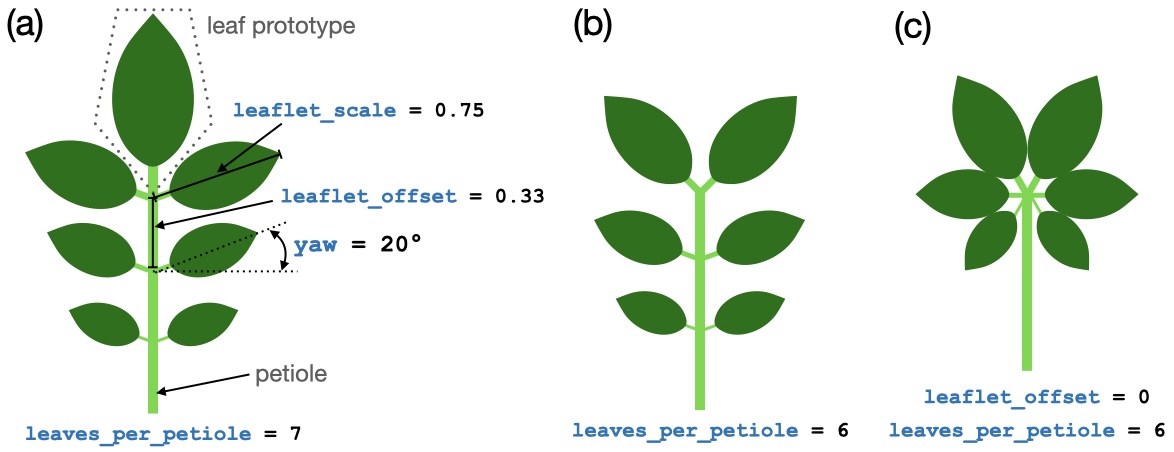
Alternatively, a compound leaf could be created by adding a single "leaf prototype" that contains all of the leaflets in a single model/mesh and specifying 1 leaf per petiole. However, the drawback of this is that it would not be possible to add random variation to the appearance of the compound leaf (e.g., leaf pitch angle, leaf yaw angle, etc.).
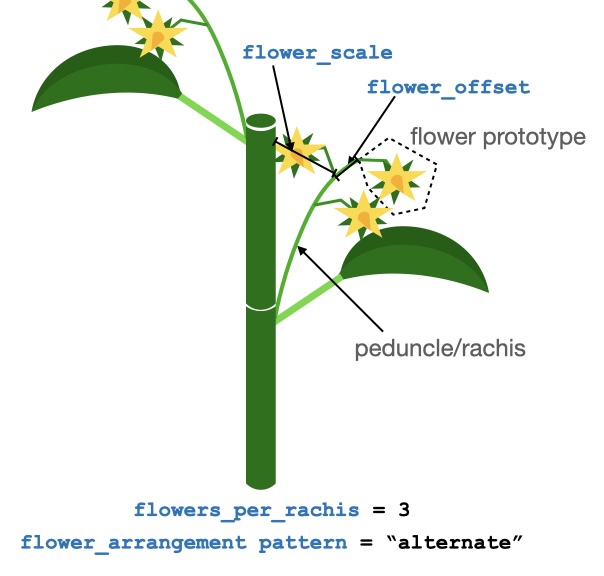
The term 'inflorescence' used to denote the peduncle and flowers together. The peduncle is the supporting structure that connects the internode to the flowers. In this model, we do not distinguish between the peduncle (part between the internode and first flower) and the rachis (part that connects adjacent flowers when there are multiple flowers per inflorescence) - this is all considered the peduncle for simplicity.
If flowers_per_peduncle is greater than 1, the flowers are arranged along the peduncle in a pattern specified by the parameter flower_arrangement_pattern (the two options are "alternate" and "opposite"). The flower_offset parameter specifies the spacing between adjacent flowers along the peduncle.
The sketch below shows an example of one parameter set for the infloresence.
A shoot is the fundamental topological unit of organization in the plant architectural model, and consists of a series of connected phytomers. Each phytomer contains one or more vegetative buds at the point where the petioles meet the internode, which have the possibility to spawn child shoots.
Parameters defining the geometry and growth of the shoot are given in the ShootParameters structure. Each parameter in the ShootParameters structure is summarized in the table below, and described in more detail in the following sections.
| Parameter | Type | Default | Units | Description |
|---|---|---|---|---|
| — Phytomer Parameters — | ||||
| phytomer_parameters | PhytomerParameters | - | - | Parameters defining the geometry of the phytomers comprising this shoot. |
| — Geometric Parameters — | ||||
| max_nodes | RandomParameter_int | 10 | - | Maximum number of nodes/phytomers along a shoot. |
| max_nodes_per_season | RandomParameter_int | 10 | - | Maximum number of nodes/phytomers that a shoot can produce in a single season ( \(\leq\) max_nodes). |
| insertion_angle_tip | RandomParameter_float | 20 | degrees | Angle of the child shoot with respect to the parent shoot at the tip of the parent shoot. |
| insertion_angle_decay_rate | RandomParameter_float | 0 | degrees/node | Rate of increase of the child insertion angle moving down the parent shoot. |
| internode_length_max | RandomParameter_float | 0.02 | meters | Maximum length (with respect to position along the parent shoot) of the internode of a child shoot. |
| internode_length_min | RandomParameter_float | 0.002 | meters | Minimum length (with respect to position along the parent shoot) of the internode of a child shoot. |
| internode_length_decay_rate | RandomParameter_float | 0 | meters/node | Rate of decrease of the internode length moving down the parent shoot. |
| base_roll | RandomParameter_float | 0 | degrees | Roll angle of the shoot, which effectively specifies the angle of the first petiole relative to the parent shoot. |
| base_yaw | RandomParameter_float | 0 | degrees | Yaw angle of the shoot relative to the parent shoot. |
| gravitropic_curvature | RandomParameter_float | 0 | degrees/meter | Curvature angle of the shoot per unit length of shoot. If curvature is positive, shoot curves upward toward vertical. If negative, curvature is downward. |
| tortuosity | RandomParameter_float | 0 | degrees/(meters)^0.5 | Factor determining the amount of random "wiggle" in internode growth along the shoot. |
| — Growth Parameters — | ||||
| phyllochron_min | RandomParameter_float | 1.0 | days/leaf | Minimum time between the emergence of successive phytomers along the shoot (minimum time or maximum growth rate). The actual phyllochron can be increased dynamically if the carbohydrate model is enabled. |
| elongation_rate_max | RandomParameter_float | 0.2 | meter/meter/day | Maximum relative rate of elongation of the internode of the shoot. Units are meters of elongation per meter of maximum internode length per day. The actual elongation rate can be reduced dynamically if the carbohydrate model is enabled. |
| girth_area_factor | RandomParameter_float | 0 | cm^2 branch area / m^2 downstream leaf area | Cross-sectional area of internode (girth), determined by the amount of downstream leaf area. The girth will only increase and does not decrease if leaves are lost. Set this factor to 0 to prevent girth scaling. |
| vegetative_bud_break_time | RandomParameter_float | 5 | days | Amount of time after the bud is created or after dormancy is broken for the vegetative bud to break. |
| vegetative_bud_break_probability_decay_rate | RandomParameter_float | 0 | 1/nodes | Rate at which the probability a bud produces a shoot changes along the shoot. If >0, probability is 1 at the shoot base and decreases to a value of vegetative_bud_break_probability_min. If <0, the probability is 1 at the shoot tip and decreases backward. |
| vegetative_bud_break_probability_min | RandomParameter_float | 0 | - | Probability of a bud breaking dormancy and emerging as a shoot. |
| flower_bud_break_probability | RandomParameter_float | 0 | - | Probability of a flower bud emerging as a flower. |
| fruit_set_probability | RandomParameter_float | 0 | - | Probability of a flower becoming a fruit. |
| growth_requires_dormancy | bool | false | - | Flag indicating whether or not the vegetative buds require a winter dormancy period to break into a shoot. If true, the shoot will emerge in the same growing season as the parent shoot. If false, the shoot will emerge from a bud that requires a winter dormancy period. |
| flowers_require_dormancy | bool | false | - | Flag indicating whether or not the flower buds require a winter dormancy period to emerge. If true, the flowers will emerge in the same growing season as the parent shoot. If false, the flowers will emerge from a bud that requires a winter dormancy period. |
| determinate_shoot_growth | bool | true | - | Flag indicating whether or not shoot growth is determinate. If true, shoot growth will stop once flowering occurs, and the apical bud will become dormant. If false, the shoot will continue growing after flowering. |
max_nodes is the maximum number of phytomers that a single shoot can grow to have. Leaves will continue to emerge from the terminal bud according to the phyllochron until max_nodes is reached.
max_nodes_per_season is the maximum number of phytomers that a shoot can produce in a single growing season, and should be less than or equal to max_nodes. This parameter is used to limit the number of phytomers that a shoot can produce in a single growing season such that it eventually stops growing for the season, but can still put on additional phytomers in following seasons.
Note that some species place organs relative to max_nodes rather than at fixed node indices, so changing it moves those organs. For maize, the ear position is measured downward from the tassel – see Maize Ear Placement and Prolificacy.
base_roll is the roll angle of the first phytomer of the shoot about the shoot axis relative to vertical. If base_roll = 0, the first petiole along the shoot will be vertical (or as vertical as is possible given the shoot direction and the specified angle of the petiole relative to the internode). This parameter is used to set the initial orientation of the shoot. For example, if base_roll = 0, the first phytomer of the shoot will be oriented vertically. If base_roll = 30, the first phytomer of the shoot will be oriented 30 degrees from vertical.
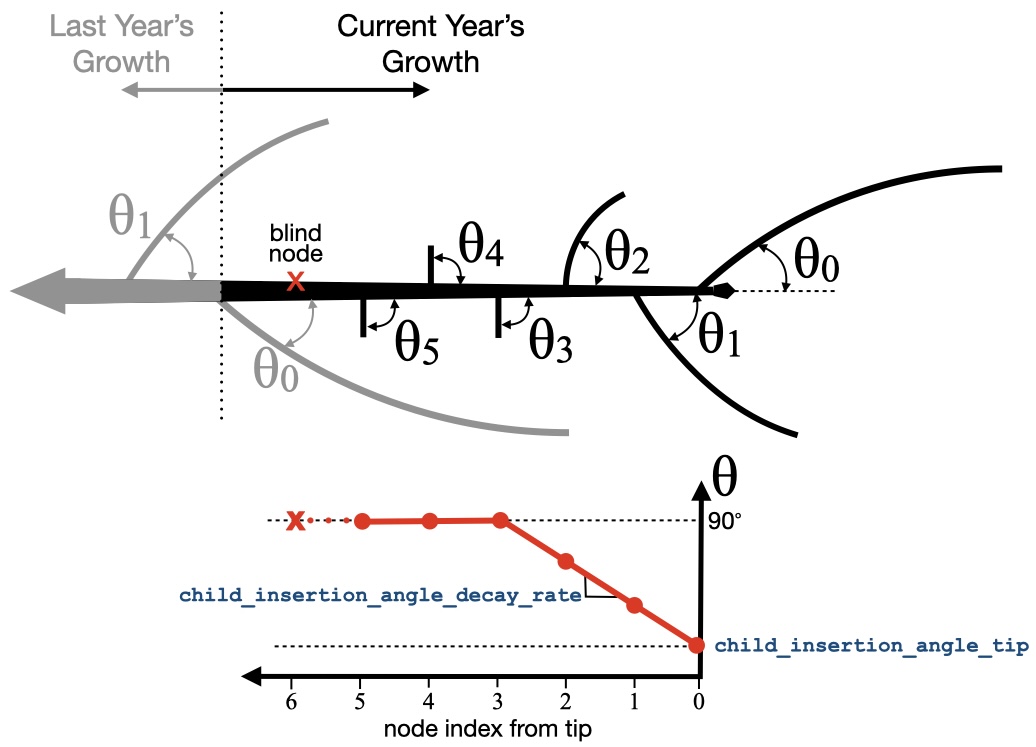
The insertion angle of child shoots is the angle that a child shoot makes with its parent shoot growth axis.
The methodology for determining the insertion angle of a child shoot differs depending on whether the shoot emerges from a bud that requires a winter dormancy period (proleptic shoot), or whether the shoot emerges in the same growing season. This behavior is set based on the parameter ShootParameters::growth_requires_dormancy (more information on this parameter below).
For buds NOT requiring dormancy (ShootParameters::growth_requires_dormancy = false), the insertion angle of the child shoot is simply given by the parameter insertion_angle_tip (degrees). (In this case, the parameter insertion_angle_decay_rate is not used.)
For buds requiring dormancy (proleptic; ShootParameters::growth_requires_dormancy = true), the insertion angle of the child shoot is the smallest at the tip of the shoot (at the time dormancy is broken) and increases moving down the shoot toward and angle of 90 degrees.
As shown in the figure below, the insertion angle at the shoot tip is given by the parameter insertion_angle_tip (degrees). The angle increases linearly at a rate of insertion_angle_decay_rate (units of degrees per node) until it reaches a maximum insertion angle of 90 degrees. For example, if insertion_angle_tip = 20 degrees and insertion_angle_decay_rate = 20 degrees/node, the insertion angle at the second node from the tip would be 40 degrees, 60 degrees at the third node, 80 degrees at the fourth node, and 90 degrees at all subsequent nodes, up until reaching the previous year's growth.
The "potential" or fully elongated internode length is specified for a shoot, and is constant along the length of the shoot. When a phytomer emerges from a bud (either apical or lateral along a parent shoot) it's internode is scaled to some short initial size, and elongates over time according to the elongation rate parameter (see below).
Similar to determination of the child insertion angle, the methodology for determination of the fully elongated internode length of a child shoot depends on whether or not the child shoot is emerging from a dormant bud.
For buds NOT requiring dormancy (ShootParameters::growth_requires_dormancy = false), the potential length of internodes along a shoot is determined according to the value of the internode_length_max parameter.
For buds requiring dormancy (proleptic; ShootParameters::growth_requires_dormancy = true), the potential length of a shoot's internodes is maximum at the tip of the shoot (at the time dormancy is broken) and decreases moving down the shoot. The potential length of the internode at the tip of the shoot is given by the parameter internode_length_max. The length decreases linearly at a rate of internode_length_decay_rate (units of meters per node) until it reaches a minimum length given by the parameter internode_length_min. For example, if internode_length_max = 0.1 m, internode_length_min = 0.01 m, and internode_length_decay_rate = 0.03 m/node, the potential length of the internode at the second node from the tip would be 0.07 m, 0.04 m at the third node, 0.01 m at the fourth node, and 0.01 m at all subsequent nodes, up until reaching the previous year's growth.

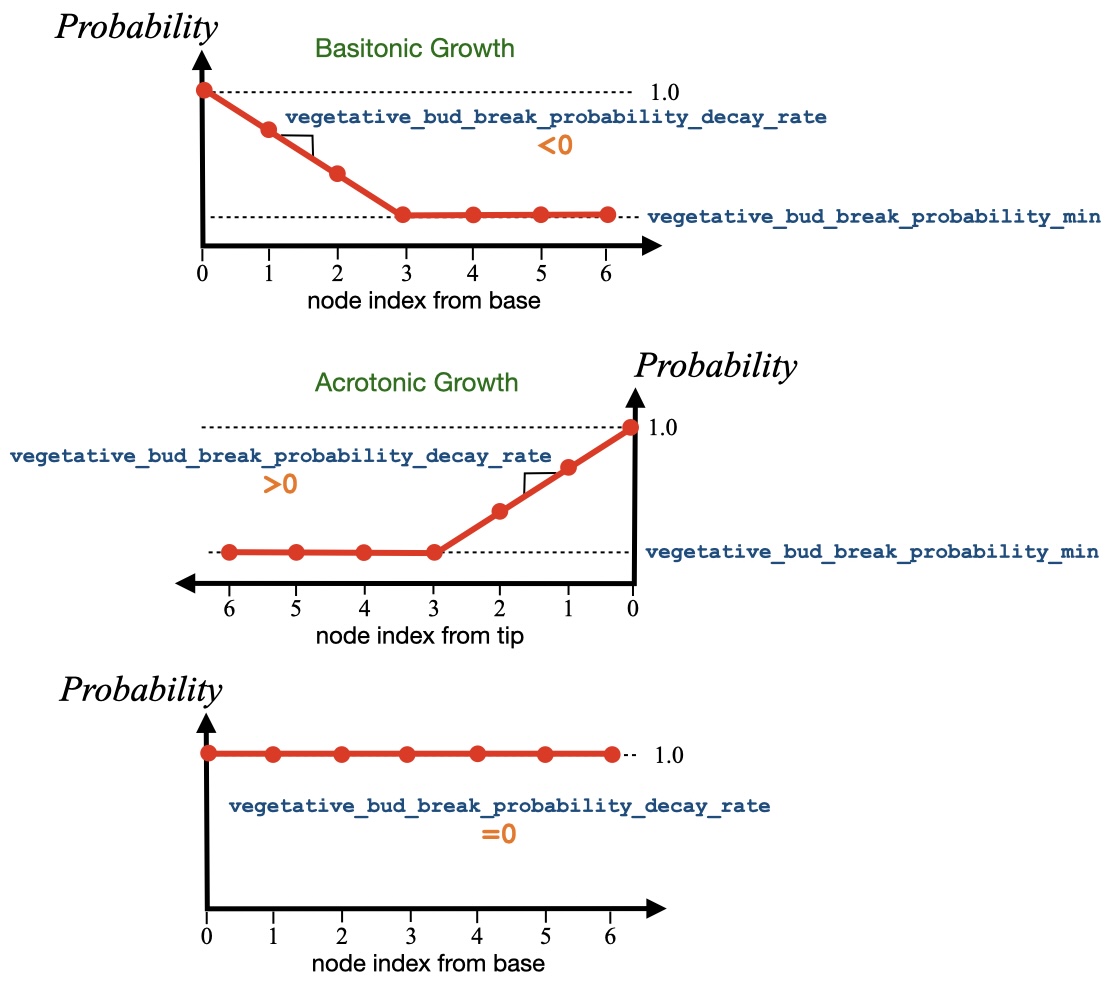
The probability that a vegetative bud will break and produce a new shoot can vary along the shoot and is controlled by the parameters vegetative_bud_break_probability_min and vegetative_bud_break_probability_decay_rate. If vegetative_bud_break_probability_decay_rate<0, the probability that the first bud on the shoot will break is 100%, and the probability decreases by vegetative_bud_break_probability_decay_rate at each node until it reaches a value of vegetative_bud_break_probability_min. If vegetative_bud_break_probability_decay_rate>0 (and growth_requires_dormancy is true), the probability that the last (apical) bud on the shoot at the time dormancy is broken will break is 100% and the probability decreases moving down the shoot.
Special Cases: If vegetative_bud_break_probability_decay_rate=0, the probability of bud break is always 100% along the shoot. If vegetative_bud_break_probability_decay_rate>0 and growth_requires_dormancy is false, the probability of bud break is always equal to vegetative_bud_break_probability_min.
The tendency of shoots to grow toward vertical is given by the parameter gravitropic_curvature. This parameter is the curvature angle of the shoot per unit length of shoot. If curvature is positive, the shoot curves upward toward vertical. If negative, the shoot curves downward. Once the shoot has reached vertical, it will continue to grow vertically. For example, a shoot that emerges from the bud growing horizontally with gravitropic_curvature = 90 degrees/meter will curve upward such that it will be growing upward after the first meter of growth.
Random "wiggle" can be added to shoot growth using the tortuosity parameter. Each time a phytomer is added to the shoot, some constant amount of differential curvature is added according to the parameter gravitropic_curvature. To introduce random variation, an additional amount of noise is added to the curvature based on a Langevin-like equation (Brownian motion):
\[ d\theta = -\frac{1}{2}\left(\theta\right)dL + T\xi(dL) \]
where \(d\theta\) is the change in curvature angle of the current phytomer internode relative to the previous internode, \(\theta\) is the integrated curvature angle relative to the base of the shoot, \(dL\) is the internode length, \(T\) is the tortuosity, and \(\xi (dL)\) is a Gaussian process with variance of \(dL\).
The phyllochron_min parameter is the time between the emergence of successive phytomers from the shoot terminal bud. Note that if the number of nodes/phytomers along the shoot reaches gravitropic_curvature, the terminal bud will die and cease producing new phytomers.
Note that this is called the "minimum" phyllochron because the phyllochron can be increased based on carbohydrate availability if the carbohydrate model is enabled. Thus, this is value corresponds to the maximum rate of growth.
The elongation_rate parameter is the rate of axial elongation of the internode of the shoot. When the phytomer is created the internode is small, and will elongate over time according to elongation_rate until it reaches its potential or maximum internode length as determined by the methodology described above. The elongation rate has units of length added to the internode per day.
When the shoot is created, the internode radius is set to the value of the phytomer parameter internode.radius_initial. The girth of the internode will increase over time based on the amount of leaf area downstream of the internode. The girth of the internode is determined by the parameter girth_area_factor, which is the cross-sectional area of the internode (girth) in cm^2 per m^2 of downstream leaf area. The girth will only increase and does not decrease if leaves are lost. Set this factor to 0 to prevent girth scaling.
Building a plant from the library with modified parameters is similar to above, except that the parameters are modified before calling the PlantArchitecture::buildPlantInstanceFromLibrary() method. After calling PlantArchitecture::loadPlantModelFromLibrary(), the parameters can be queried (at the shoot level), modified, and then set.
Parameters are queried based on shoot type (the names of which are given in the table above). The user can either query the ShootParameters structure for a single shoot type based on its label, or for all shoot types in the particular model.
The default parameters for each shoot type and species from the library are not listed exhaustively in this documentation, but can be found in the file PlantLibrary.cpp.
Below is an example of modifying the parameters of a single shoot type:
Below is an example of modifying the parameters for all shoot types:
Replacing a shoot type replaces it entirely. Both PlantArchitecture::defineShootType() and PlantArchitecture::updateCurrentShootParameters() overwrite the stored entry for a shoot type in its entirety rather than merging into it. In the examples above this is harmless, because the ShootParameters structure was obtained by copying the existing one, and an ordinary C++ copy carries everything along – including the function pointers that customize the species (the phytomer creation and callback hooks, and the leaf, flower, and fruit prototype functions).
It is not harmless if the ShootParameters is reconstructed from plain values rather than copied. This arises for callers that cannot hold a C++ structure – for example a scripting-language binding that flattens the parameters to a dictionary, lets the user edit them, and rebuilds the structure from those values. Function pointers cannot survive that round trip, so the rebuilt structure is value-correct but has lost every function pointer, and committing it silently strips the species' customizations. For maize, losing phytomer_creation_function means ears are never assigned and nearly every node produces a tassel instead.
Such a caller is responsible for re-attaching the function pointers before committing, using ShootParameters::inheritCustomFunctionsFrom():
Committing a shoot type stores the values it was given: the shoot-level random parameters are not re-drawn, so reading a shoot type and writing it straight back without editing anything leaves the model unchanged. This is not true of the phytomer parameters nested inside it, which are deliberately re-randomized each time a phytomer is created so that phytomers on the same shoot vary.
Note that the map overload of PlantArchitecture::updateCurrentShootParameters() replaces all shoot types at once, so a caller round-tripping the whole map must inherit separately for each entry, matching each rebuilt structure against the original of the same label.
Maize is monoecious: a single terminal tassel forms from the apical meristem, and axillary ear meristems form at every above-ground node except the upper six to eight below the tassel. Because of apical dominance, only the uppermost eligible node develops into a harvestable ear.
The model follows this convention. The ear-bearing node is defined relative to the top of the shoot rather than by an absolute node index:
So the default maize plant ( max_nodes = 20) bears its ear at node 14, and raising max_nodes to 25 moves the ear to node 19. The ear therefore stays in the correct part of the canopy as plant size changes. A shoot with six or fewer nodes bears no ear.
Commercial hybrids are near-strictly single-eared, so the model bears one ear. Both the offset from the tassel and the number of ears are constants at the top of MaizePhytomerCreationFunction() in plugins/plantarchitecture/src/Assets.cpp:
Setting ears_per_plant to 2 additionally bears an ear at the node immediately below the apical one, representing the second sub-apical ear seen at low planting density and high nitrogen.
Each plant model in the library defines one or more shoot types (e.g., "trunk", "branch", "unifoliate", "trifoliate"). You can query which shoot types are available using PlantArchitecture::listShootTypeLabels() to help identify the correct labels for customizing parameters.
If you have already loaded a plant model, you can list its shoot types:
You can also query shoot types for any plant in the library without changing your current plant model:
For plant instances that have been built, you can query their shoot types using the plant ID:
This functionality is useful for:
Note: Plant models are templates defined in the library (referenced by string names like "bean", "tomato"), while plant instances are actual plants built in the simulation (referenced by uint IDs). The shoot types are defined at the model level and captured when each instance is created.
Thresholds determining phenological transitions are set using the PlantArchitecture::setPlantPhenologicalThresholds() method. The thresholds are in arbitrary time units, which should be consistent with the timestep units and units of other parameters. The table below describes each of the phenological parameters. Setting any parameter to a negative value will skip that phenological stage.
Default phenology for manually-built plants. Every plant model in the library calls PlantArchitecture::setPlantPhenologicalThresholds() as part of its builder, so library-built plants always have thresholds configured. A plant assembled manually (PlantArchitecture::addPlantInstance() together with PlantArchitecture::addBaseStemShoot(), PlantArchitecture::appendShoot(), and PlantArchitecture::addChildShoot()) does not, and instead keeps the default thresholds, which encode "no phenology scheduled": the plant grows vegetatively and never flowers, sets fruit, or enters dormancy. This is the same configuration produced by PlantArchitecture::disablePlantPhenology(). To give a manually-built plant a reproductive cycle or a dormancy period, call PlantArchitecture::setPlantPhenologicalThresholds() on it explicitly.
Maximum age for manually-built plants. A plant also stops growing once it reaches its maximum age, set with PlantArchitecture::setPlantMaxAge() and read back with PlantArchitecture::getPlantMaxAge(). This follows the same pattern as the phenological thresholds: every library builder sets its own value (the apple model uses 1460 days), while a manually-built plant keeps the default of 999 days. Once that age is reached, PlantArchitecture::advanceTime() stops advancing the plant and its geometry becomes static. No message is issued, so a manually-built plant that needs to grow for longer appears to stop for no reason after roughly 1000 days. Raise the cap before advancing past it:
Setting a maximum age below the plant's current age is permitted, and freezes the plant at its current form.
The PlantArchitecture plugin includes a streamlined system for adding new plant species to the built-in library. This section describes the workflow for implementing a new plant model.
Adding a new plant model to the library involves the following steps:
initialize[*]Shoots() and build[*]() methods that define the plant's architecture and parameters in PlantLibrary.cpp. You can find many examples in this file for existing plants.PlantArchitecture::initializePlantModelRegistrations() in PlantLibrary.cpp to make the model available in the library. This can be found at the top of PlantLibrary.cpp, with examples for existing plants.A good approach is to start with an existing plant model that is similar to the new plant, and copy paste its code initialize[*]Shoots() and build[*]() for your new plant. You can then tweak parameters to achieve your desired result.
Most plant models require visual assets located in plugins/plantarchitecture/assets/. You can either create your own, or copy existing assets from other plants if they are similar enough.
Texture Images (assets/textures/):
NewPlantLeaf.png)NewPlantBark.jpg)3D Models (assets/obj/):
Asset Guidelines:
[PlantName][OrganType].[ext]For a new plant called "newplant", you need to implement two methods in the PlantArchitecture class:
Method Declarations (add to PlantArchitecture.h):**
Method Implementations (add to PlantLibrary.cpp):**
The initialize*Shoots() method defines all shoot types and their parameters:
The build*() method creates the actual plant instance:
Add a single registration line to the PlantArchitecture::initializePlantModelRegistrations() method in PlantLibrary.cpp:
The PlantArchitecture plugin provides comprehensive methods for querying shoot hierarchy and performing pruning operations. These methods enable systematic management of plant structure based on branching patterns, shoot ranks, and topological relationships.
Several methods are available to query the hierarchical structure of shoots within a plant:
| Method | Description |
|---|---|
| \ref PlantArchitecture::getShootIDsByRank() | Returns shoots organized by branching rank/order in a vector of vectors. |
| \ref PlantArchitecture::getShootHierarchyMap() | Returns a map of parent shoot IDs to their direct children. |
| \ref PlantArchitecture::getAllDescendantShootIDs() | Returns all descendant shoots of a given shoot recursively. |
| \ref PlantArchitecture::getChildShootIDs() | Returns direct child shoots of a given shoot. |
| \ref PlantArchitecture::getParentShootID() | Returns the parent shoot ID (-1 for base shoots). |
| \ref PlantArchitecture::getShootRank() | Returns the branching rank/order of a shoot. |
| \ref PlantArchitecture::getAllShootIDs() | Returns all shoot IDs for a plant. |
| \ref PlantArchitecture::getTerminalShootIDs() | Returns shoot IDs that have no children (terminal shoots). |
| \ref PlantArchitecture::getShootDepth() | Returns the hierarchy depth of a shoot. |
| \ref PlantArchitecture::getPathToRoot() | Returns the path from a shoot to the root shoot. |
The hierarchical query methods enable various pruning strategies:
Pruning by Branching Order:**
Terminal Shoot Thinning:**
Pruning Entire Branch Systems:**
The \ref PlantArchitecture::getShootIDsByRank() method is particularly useful as it organizes shoots into a vector of vectors where the index represents the branching rank, making it easy to implement systematic pruning based on plant architecture principles.
Calling PlantArchitecture::pruneBranch() with a node index of 0 removes the shoot entirely: all of its phytomers, its leaves, its inflorescences, and its internode tube geometry are deleted from the Context, and the same is done recursively to every shoot descending from it.
The shoot is not removed from the plant's shoot tree. Shoot IDs are positions in that tree, so removing an entry would renumber every later shoot and invalidate IDs already held by the caller. Instead the shoot keeps its slot and becomes inert:
Use PlantArchitecture::isShootPruned() to detect this state when iterating over shoot IDs:
Pruning is idempotent: calling PlantArchitecture::pruneBranch() again on a shoot that has already been pruned away does nothing. This matters when pruning a whole branch system, because removing a shoot also empties its descendants and a loop over shoot IDs will reach those descendants again later.
The PlantArchitecture plugin includes an optional carbohydrate model that simulates carbon allocation and its effects on plant growth dynamics. This model tracks photosynthate accumulation, maintenance and growth respiration, carbon transfer between shoots, and dynamically adjusts growth rates based on carbon availability. For detailed information on using the carbohydrate model, see the Carbohydrate Model.
The PlantArchitecture plugin includes an optional nitrogen model that simulates nitrogen uptake, allocation, and stress effects on plant growth. This model tracks nitrogen in a three-level pool structure (root, available, and per-leaf pools), implements rate-limited nitrogen accumulation in leaves, simulates age-based nitrogen remobilization from old to young leaves, and calculates a nitrogen stress factor that other plugins can use to modify photosynthesis and growth rates. For detailed information on using the nitrogen model, see the Nitrogen Model.
The Object IDs and Primitive UUIDs of an entire plant, or organ groups in the plant, can be retrieved using several methods available in the PlantArchitecture class. These are listed in the table below.
| Method | Description |
|---|---|
| Object IDs | |
| PlantArchitecture::getAllPlantObjectIDs() | Returns a vector of Object IDs for all objects the entire plant. |
| PlantArchitecture::getPlantInternodeObjectIDs() | Returns a vector of Object IDs for all internode objects. |
| PlantArchitecture::getPlantPetioleObjectIDs() | Returns a vector of Object IDs for all petiole objects (Tube objects). |
| PlantArchitecture::getPlantLeafObjectIDs() | Returns a vector of Object IDs for all leaf objects. |
| PlantArchitecture::getPlantPeduncleObjectIDs() | Returns a vector of Object IDs for all peduncle objects (Tube objects). |
| PlantArchitecture::getPlantFlowerObjectIDs() | Returns a vector of Object IDs for all flower objects. |
| PlantArchitecture::getPlantFruitObjectIDs() | Returns a vector of Object IDs for all fruit objects. |
| Primitive UUIDs | |
| getAllPlantUUIDs() | Returns a vector of UUIDs for all primitives in the entire plant. Optionally includes hidden prototype primitives when include_hidden is set to true. |
Note that individual methods to get UUIDs for all organ types are not provided. Instead, the user can query the Object IDs for each organ type and then get the corresponding UUIDs using the Context method helios::Context::getObjectPrimitiveUUIDs().
In some cases, it may be useful to get the UUIDs of sub-components that make up organ prototypes. For example, this is necessary in order to change the color or radiative properties of leaf veins or flower petals.
If such granularity is present in the organ prototype models, these sub-components are separated based on primitive data labels assigned to them.
| Organ | Primitive Data Label | Primitive Data Value String | Description |
|---|---|---|---|
| Leaves | |||
| Leaf/lamina | "object_label" | "leaf" | The main lamina of the leaf. |
| veins | "object_label" | "veins" | The major veins of the leaf. |
| petiolule | "object_label" | "petiolule" | The petiolule (i.e., petiole-like structure connecting a leaflet to the petiole in a compound leaf). |
| Flowers | |||
| Petals | "object_label" | "petals" | The petals of the flower. |
| Sepals | "object_label" | "sepals" | The sepals (i.e., green part at base) of the flower. |
| Fruit | |||
| Fruit | "object_label" | "fruit" | The main body of the fruit. |
| Sepals | "object_label" | "sepals" | The sepals (i.e., green part at base) of the fruit. |
The UUIDs for a given sub-organ group can be retrieved by calling the Context method helios::Context::filterPrimitivesByData(). Below is an example for getting the leaf vein UUIDs.
For custom user-defined organ prototypes, users should follow the convention of grouping the above sub-components into separate object groups with the labels given in the table above.
 1.9.8
1.9.8